To help our partners protect sensitive verification data and prevent fraudulent reuse of documents, we have introduced a Custom Watermarking feature.
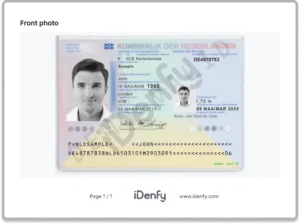
What’s new? Partners can now upload their own unique watermark (such as a company logo or specific text) directly through the Dashboard. Once uploaded, this watermark is automatically applied to all Identity Verification (IDV) photos and generated verification PDF reports.
Automate your identity verification
See how iDenfy helps 1,000+ companies verify customers in seconds with AI-powered KYC.
Explore iDenfyKey features:
-
Automated Protection: The system applies your watermark with a 15% opacity to ensure the document remains legible while clearly marking it as your property.
-
Full Coverage: Watermarks are visible on IDV photos, PDF summaries, webhooks, and even sample documents.
-
Retroactive Security: Once a watermark is added, it is applied to both new and existing (historical) verifications, ensuring your entire database is protected.
-
Reviewer-Friendly: To ensure verification accuracy, watermarks are hidden from the internal Reviewer’s view, allowing your team to inspect documents without any visual interference.
-
Dashboard Control: A new setting allows you to easily upload, update, or remove your watermark file (PNG with transparency recommended) at any time.
Why it matters: Verification assets are often shared with third parties or end-clients. Without identification, these assets are at risk of being intercepted and used for “re-packaging” scams or repeat IDV processes on other platforms. Custom watermarking ensures that your verification data is uniquely tied to your organization, drastically reducing the risk of unauthorized use.



