Bank Card Verification to Know the Card, Not Just the Customer
Link bank card ownership with a properly verified customer identity and improve your existing Know Your Customer (KYC) verification system. iDenfy triggers standalone payment card capture or integrates it into your onboarding flow to potentially detect mismatches and prevent fraud.
 Auto bank card capture Built-in ID document check
  Selfie verification & liveness PCI DSS compliance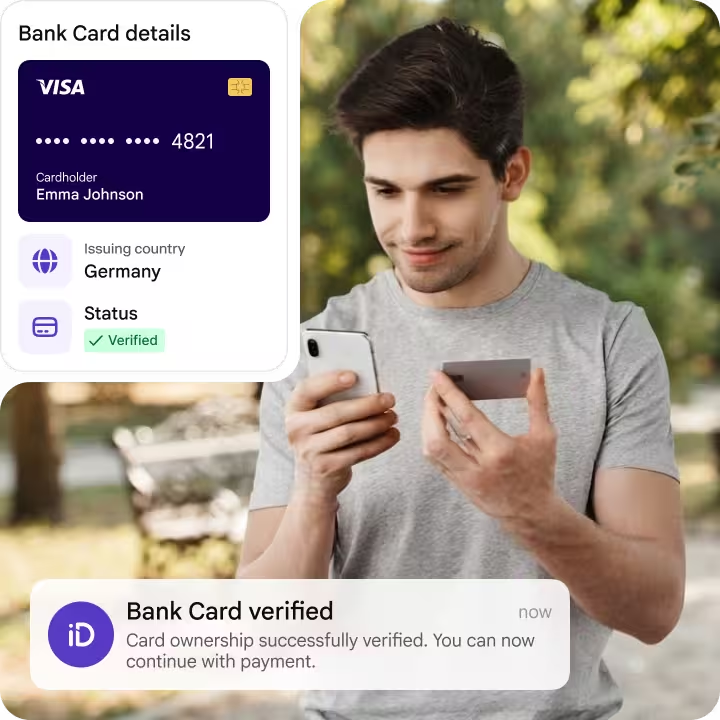
Trusted by 1,000+ companies worldwide

Match payment card details against KYC data, including the cardholder's full name and last four digits
Ask for a physical bank card and avoid duplicates
Stop clients who try to bypass identity verification with the same bank card and instantly deny blocklisted users.
Catch fraud before it turns into a chargeback
Verify the bank card is real and that it belongs to the person submitting it to prevent unauthorized transactions.
Detect account takeover attempts
Trigger bank card verification before high-risk payments or when suspicious activity is detected.
How iDenfy's Bank Card Verification works
Enable the payment card capture
Ask the user for their bank card
Get matched card ownership results

iDenfy complies with PCI DSS
Bank Card Verification handles credit and debit card information in line with the highest security standards, including PCI DSS. CVV, full card number and card images aren't captured or stored.
Learn more about security
Verify that the bank card truly belongs to the person capturing it
Verify card details and ensure payouts reach the right recipient
Cross-check the extracted cardholder name and their card digits against previously matched KYC profile details and trigger reverification in high-risk situations to prevent ATO attacks or fraudulent card additions that result in payouts to the wrong account and unwanted chargebacks.
- Simple end-user U/X
- Face Authentication & reverification
- Full-cycle fraud prevention

Improve your IDV acceptance rate with auto-capture capabilities
Onboard more users without manual entry errors causing drop-offs. Allow users to take out their bank card and frame it within the system's capture window, so it can automatically read the card details and determine whether they're real. With iDenfy, abandoned verifications are free.
- Pay-Per-Approved pricing
- White-label & design options
- Extra manual review available
Get the full picture for your KYC onboarding process
Collect different risk signals in seconds and still ensure the user converts faster due to the frictionless, auto-first approach to user onboarding. Enable ID document checks, selfie verification, bank card ownership validation, and more, all without coding and using iDenfy's dashboard.
- Document verification
- Biometrics & liveness
- Non-doc eID workflows
Flag unsupported cards and automatically trigger an alternative workflow
Switch to a credit card statement upload to avoid unsupported cards without a visible full name or number on the front. Block returning users who previously used a fake or an already associated bank card. Set custom blocklist rules to restrict specific card types, countries, or other risk signals.
- Easy integration
- Risk-based onboarding
- Stronger payment verification
Bank Card Verification solution that works in any industry
iGaming & Sports Betting
Cryptocurrency
E-Commerce & Marketplaces
Sharing Mobility
Banking & Fintech


We are G2’s Top Pick
Being designed for everyone and engineered for all business needs allowed us to surpass competitors in the KYC/AML field.
Talk to us

![Bank Card Verification [Guide]](data:image/svg+xml;base64,PHN2ZyB2aWV3Qm94PSIwIDAgMTAyNCA1MTIiIHdpZHRoPSIxMDI0IiBoZWlnaHQ9IjUxMiIgeG1sbnM9Imh0dHA6Ly93d3cudzMub3JnLzIwMDAvc3ZnIj48L3N2Zz4=)
Frequently Asked Questions
Help CenterWhat card data does iDenfy store during bank card verification?
iDenfy doesn't capture or store the CVV, and doesn't retain the full card number on purpose. The payment card verification reads the cardholder's name and the last four digits from the captured image, matches them against the verified KYC profile, and returns the result (Match/No Match). Data handling follows GDPR and ISO 27001 standards. You can find out more about it in our Documentation
Is bank card verification the same as an AVS or BIN check?
How does iDenfy's Bank Card Verification solution determine the user is capturing a real card?
Which bank cards can users verify?
Is bank card verification a regulatory requirement?
Will asking for a bank card increase onboarding drop-offs?
Add automated cardholder verification today
Use iDenfy's Bank Card Verification to improve your existing ID verification flow, instantly detecting card testing, card-not-present fraud, and other common bypassing attempts.
Get started for free