We’ve introduced a major update to our Identity Verification (IDV) flow designed to minimize friction and significantly speed up the onboarding process for your users.
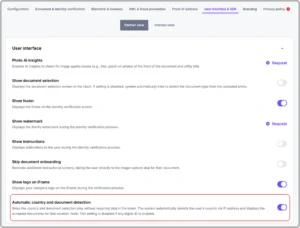
What’s new? The new “Skip Document and Country Selection” setting allows users to bypass manual selection steps and jump directly into the document capture phase. This “scan-to-finish” approach aligns with modern UX standards, providing a faster and more intuitive experience.
Automate your identity verification
See how iDenfy helps 1,000+ companies verify customers in seconds with AI-powered KYC.
Explore iDenfyKey features of the optimized flow:
-
Smart Auto-Recognition: The system uses a two-tier logic to identify documents. It first attempts to recognize the document based on the user’s IP address. If no match is found, it automatically performs a global database search.
-
Direct-to-Capture Experience: When enabled, the verification flow leads directly to the camera, reducing the number of steps required to start the process.
-
Dynamic UX Fallbacks: If the system cannot accurately detect the document or if the IP-based country is incorrect (e.g., due to a VPN), users are presented with clear fallback options to manually select their country or document type directly from the capture screen.
Why it matters: Reducing manual input leads to higher completion rates and lower drop-off during the verification process. By removing the need for users to scroll through country lists and document types, you provide a more seamless journey that feels modern and effortless.
How to enable: You can find the new configuration in your Dashboard settings. When disabled, the flow will continue to function in the traditional “select-then-scan” mode.



