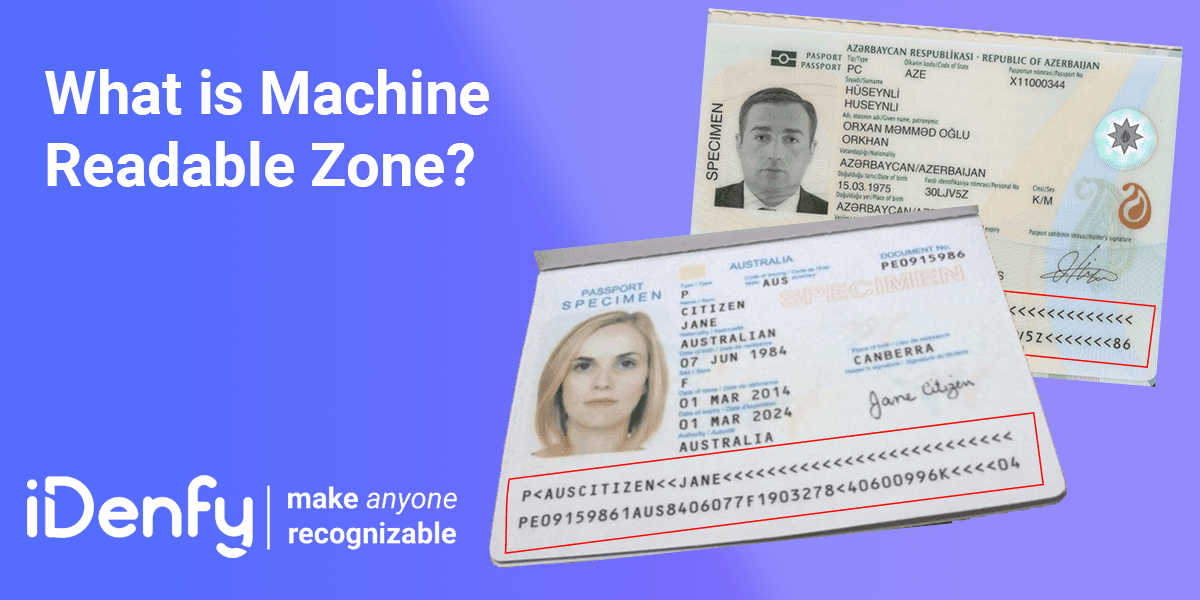
An MRZ, or a machine readable zone, is an area on a government-issued ID document that encodes personal information about its holder. In a sense, it’s a revolutionary little fragment that helps AI and automated systems scan and extract these personal details, which is part of the standard Know Your Customer (KYC) verification process.
Banks, fintechs and other businesses that are regulated use ID document verification, which consists of reading the ‘machine-readable zone’ to find out if the user online is providing legitimate information and isn’t using forged documents. However, in a more traditional sense, not digital onboarding, MRZ codes are also scanned widely in airports as a security measure and a way to help passengers get through gates safely and quickly, which is important for the convenience aspect, not just fraud prevention or access control.
Who this is for — and what it’s not
For product, fraud, and compliance teams building or evaluating document verification flows that rely on MRZ data extraction, whether at onboarding, reverification, or border-adjacent use cases like travel and telecom.
Not a technical specification of ICAO Doc 9303, and not a guide to manually decoding MRZ lines by eye. For a closer look at the technology that actually reads the MRZ, see What is Optical Character Recognition (OCR).
What is the Machine Readable Zone (MRZ)?
The Machine Readable Zone (MRZ) is a particular area in an identity document (passport, identity card, or residence permit specifically) that encloses the document holder’s data. Nowadays, almost every country’s official identity or travel documents have an MRZ, containing encrypted confidential information. Generally, the Machine Readable Zone has two or three lines of printed OCR (Optical Character Recognition) text.
It encodes (but not encrypts) the holder’s key details in a fixed format defined by ICAO Doc 9303, so any compliant scanner/smartphone camera can extract and validate the data. The ICAO Doc 9303 MRZ format consists of:
- Numbers (0–9)
- A fixed-width OCR-B font, capital letters (A–Z)
- The < symbol as a filler
See the following image to recognize the machine-readable zone in a passport:
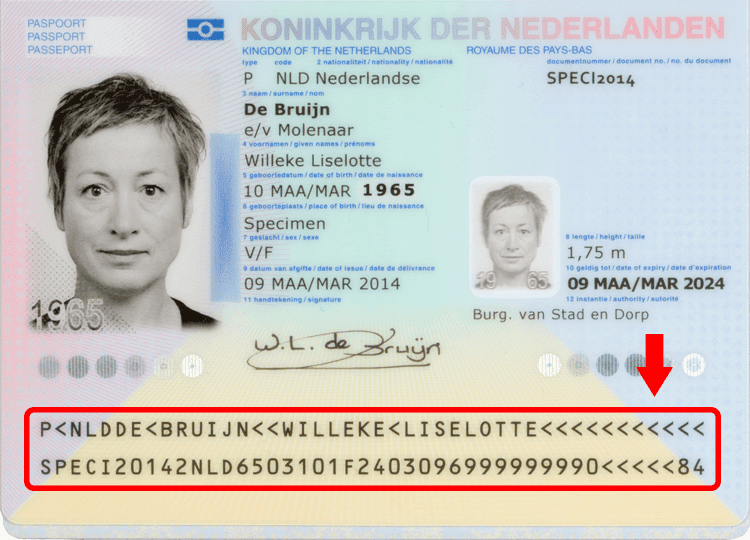
For example, the MRZ code is at the bottom of a passport’s data page or on the back of an ID card. Passports (TD3) use two lines of 44 characters. TD2 documents use two lines of 36 characters. ID cards (TD1) use three lines of 30 characters. The MRZ-based documents are machine-readable because a machine only reads the text they contain.
Automate your identity verification
See how iDenfy helps 1,000+ companies verify customers in seconds with AI-powered KYC.
Explore iDenfyThe History of Machine-Readable Documents
In 1980, a machine-readable zone was added to the passport’s identity page for the first time. Today, along with the photo and necessary details (full name, date of birth, passport number, passport expiration date, etc.) of the passport holder, the identity page includes two lines containing some letters, numbers, and symbols known as the MRZ line.
In 1983, the U.S. Government Accountability Office highlighted the benefits of machine-readable information. The use of the Machine Readable Zone has become more popular. Today, it is used in national identity and travel documents. Unique optical character recognition equipment is required to read the information embedded in MRZ. Nowadays, it can be accessed using a smartphone – thanks to the ever-increasing technology.
What’s the Purpose of the MRZ?
It’s not difficult for fraudsters to tamper with identity documents and manipulate the holder’s personal information for their own purpose in modern times. Many times, we have heard the news of fake passport gangs in Europe and across the globe engaged in forging documents.
A machine-readable zone in a passport and other identity documents is a significant step toward preventing unauthorized alteration of the IDs. Furthermore, it is an ideal way to speed up the verification process. With MRZ, you get the personal information of a holder in a standardized format that naturally improves the recognition and verification process.
The machine-readable zone allows you to access an RFID (Radio-frequency identification) placed inside a biometric passport. The chip encloses detailed information about the ID holder. This process is several times faster than the manual method. Moreover, the chances of errors are negligible.
How Does a Machine Read MRZ Codes?
A machine-readable zone contains encoded lines/codes, including the document holder’s data and forgery detection numbers known as the machine-readable zone’s “checksum”.
As mentioned above, a special reading device detects MRZ and reads the information encoded inside. Text recognition and conversion technology (OCR system) is used to read and verify MRZ data on travel documents, such as passports.
Encoded data is obtained by scanning and then saved in electronic format to access the data from the MRZ. There are a few stages this process goes through:
- Data scanning. In this stage, the picture of the ID document is scanned.
- Extracting data from the MRZ code. Once the ID document is scanned and the machine-readable zone is captured, the embedded text is recognized and parsed to extract the data fields. An optical character recognition (OCR) system calculates the checksum of the extracted data.
- Calculating checksums and comparing them. This is done with the original checksums for data verification. This data can also be exported to an external device for further inspection and verification.
How to Read an MRZ Line by Line
Take a standard passport MRZ (TD3 format, two lines of 44 characters):
P<LTUPAVARDENE<<VARDENE<<<<<<<<<<<<<<<<<<<<<
 1234567897LTU8501014F3001017<<<<<<<<<<<<<<02
Line 1 carries the document type (P for passport), the issuing state as a three-letter ICAO code (LTU), and the holder’s surname and given names, separated by <<. The < symbol is a filler character — it pads every field to a fixed length so a parser always knows where one field ends and the next begins.
Line 2 carries the passport number (positions 1–9) followed by its check digit, nationality, date of birth in YYMMDD format plus a check digit, sex (M, F, or <), expiry date plus a check digit, the optional personal number field, and a final composite check digit calculated over the entire line.
Related: Top 5 Identity Verification Measures [For Beginners]
Main Types of Machine-Readable Zones
In general, the MRZ types are standardized by the ICAO:
- Type 1. Used for documents like driver’s licenses and ID cards, with three lines of MRZ code, containing 30 characters.
- Type 2. Used for travel documents, which contain two lines of MRZ code, with 30 characters in each.
- Type 3. Used for other, larger documents, such as passport booklets, with two lines, containing 44 characters.
Here is each type in more detail:
Machine Readable Zone – Type 1
Type 1 is the most commonly used format for national identity cards in many countries. Three lines with 30 characters per line.

Machine Readable Zone – Type 2
Type 2 is not commonly used. Some countries, like Romania and France, use the Type 2 format for national identity cards. Two lines with 36 characters per each line.
Machine Readable Zone – Type 3
Type 3 is mostly used for passports. Two lines with 44 characters per line.
Every type of machine-readable zone shall comply with the ICAO (International Civil Aviation Organization) Doc 9303 standard.
What Data is Stored in the Machine Readable Zone?
Even without special decoders or machines, a person can look at the Machine Readable zone (MRZ) and recognize information such as name, surname, date of birth, and other important information.
The main information in the Machine Readable Zone (MRZ)
- The name and the surname of the document owner.
- The nationality of the document owner.
- The date of birth of the document owner.
- Gender of the document owner: Male (M), Female (F), or Non-specified (X).
- Expiry date of the document.
OCR technology is able to recognize the unique font in the MRZ and convert the characters into digital text. Companies today use specialized OCR software that’s tailored to recognize different documents and MRZ codes used during the identity verification process.
How MRZ Check Digits Work
A check digit is a single digit taken from other digits in a sequence to ensure accuracy. In the context of the MRZ, check digits are calculated for specific numerical data elements, allowing readers to verify that the information has been correctly processed. Every numeric field in the MRZ (like the document number, date of birth, expiry date) is followed by this check digit (computed with the ICAO 7-3-1 algorithm). This serves as a tool to detect potential fraud, confirming that the data in the MRZ zone is read correctly and that the document isn’t forged.
MRZ codes follow a standardized format, allowing them to be used across different countries and industries, which makes them a convenient way to securely verify user identities. Each character is converted to a value (digits as themselves, A=10 through Z=35, <=0), multiplied by a repeating weight of 7, 3, 1, and the sum is taken modulo 10. This is why MRZ tampering is so detectable.
If a change is made to a single character in a date of birth, the check digit no longer matches. That’s why a forger has to get every dependent value right, and the ID verification software recalculates all of them in milliseconds, detecting tampering and rejecting the attempt to bypass KYC onboarding. The standardization of MRZ codes eliminates the need for expensive custom solutions, allowing global businesses to scale faster, no matter the industry.
Related: How to Combat Document Forgery?
The Role of the Machine Readable Zone (MRZ) in the Identity Verification Industry
The role of MRZ in identity verification can’t be ignored. Nowadays, most passports and national ID documents have machine-readable zones, making it easier for responsible authorities to recognize and verify them.
Since passport verification is a standard procedure during a background check, MRZ-enabled passports have been proven useful in verifying suspected identities. After all, the machine-readable zone contains almost all the crucial details of a person, such as a name, nationality, date of birth, sex, passport expiration date, etc.
Don’t forget that passport checks and identity verification constitute a significant security measure for businesses and organizations. No matter whether it’s the airline sector, hospitality, telecommunications, sharing economy, or entertainment, today, users have to submit their ID before accessing the services.
MRZ-based ID documents help businesses conduct verification quite quickly. However, a robust MRZ recognition technology must make the verification process fast and super effective to maximize MRZ’s advantage.
Travel and Aviation
MRZ technology is a key element in global travel security and passenger processing. Airport Security and Immigration:
- Passports with MRZ enable fast and automated identity verification at border checkpoints, reducing waiting times and human error. Immigration officers use MRZ scanners to instantly extract data, verify authenticity, and detect forged or altered documents.
- Airline Check-in and Boarding: Many airlines now use MRZ passport scanners to speed up check-in, automate boarding processes, and comply with security regulations.
Banking and Financial Services
Financial institutions rely on MRZ technology to meet compliance requirements and prevent fraud.
- Know Your Customer (KYC) and Anti-Money Laundering (AML) Compliance: Banks use MRZ scanning to verify personal identity documents during account opening, loan applications, and high-value transactions, ensuring compliance with international regulations.
- Fraud prevention: By linking MRZ data to official records, financial institutions can detect fake IDs and prevent identity fraud.
Hospitality and Travel Accommodation
Hotels, vacation rentals, and car rental services use MRZ scanning to improve customer experience and security.
- Hotel check-in: MRZ scanners speed up guest check-in by automatically capturing passport or ID card details, reducing manual entry errors, and ensuring compliance with local regulations.
- Car rental and mobility services: Rental agencies use MRZ technology to validate customer IDs and driver’s licenses, ensuring a smooth verification process before handing over vehicles.
Telecom and Digital Services
Machine-readable zone (MRZ) validation helps telecom service providers and digital platforms verify users before granting access to services.
- SIM card registration: Many countries require telecom companies to verify customer identities before activating SIM cards. MRZ scanning simplifies this process and ensures compliance.
- Online and sharing economy platforms: Ride-sharing, home-sharing, and other digital services use MRZ technology to authenticate users, reducing fraud and increasing platform trust.
Entertainment and Event Security
Identity verification is increasingly required in entertainment venues, ticketing systems, and online gaming.
- Age verification for restricted content: MRZ scanning ensures that users meet the legal age requirements for online gambling, alcohol purchases, and age-restricted events.
- Secure event entry: Concerts, sporting events, and other large gatherings use MRZ-based identity verification to prevent ticket fraud and unauthorized access.
Healthcare and Medical Services
Medical facilities are integrating MRZ technology for patient identification and secure data management.
- Patient Registration: Hospitals and clinics use MRZ scanners to quickly scan patient data from personal identification documents, reducing wait times and administrative errors.
- Medical Fraud Prevention: Accurate identity verification helps prevent insurance fraud, duplicate patient records, and unauthorized access to medical services.
Identity Verification Service for MRZ Verification
At iDenfy, we offer an identity verification service that employs optical recognition systems to scan passports and other identity documents. It makes the overall identity verification process smooth and effective. With our identity verification solution, you can verify 2700 types of ID documents from more than 210 countries and territories. If you’re searching for a reliable identity verification partner, try us.
Book a meeting to learn more about us and our services.