
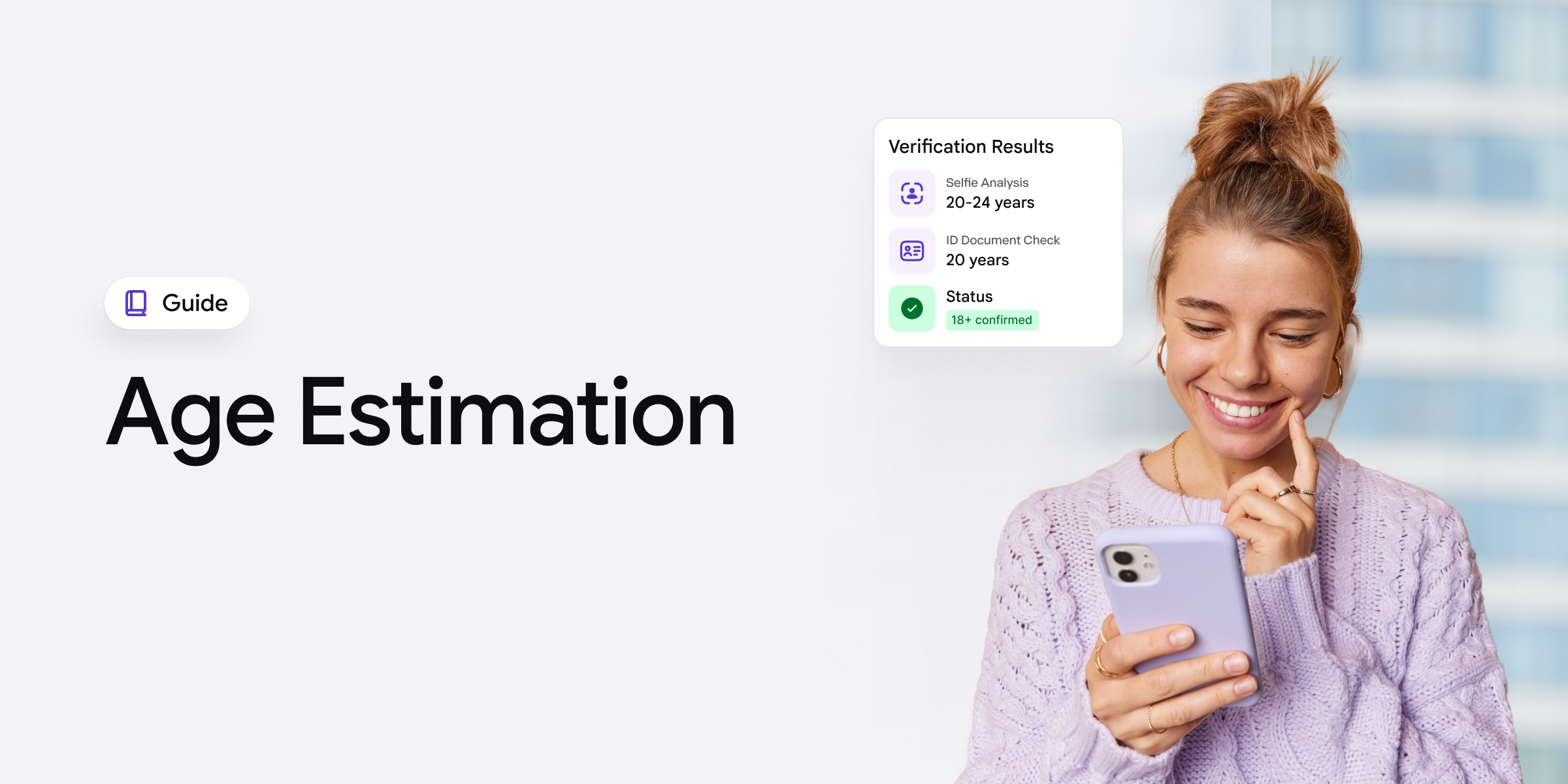
Forums like Reddit have been flooded recently with angry users, including actual minors, trying to avoid any age assurance method, which has already become the new reality of the recent age estimation procedures enforced by regulators all around the world. While some people online aren’t keen on uploading a copy of their physical ID document, they also don’t want to complete a facial biometric check, or any actual step directly linked to personal information. However, these steps aren’t enforced by the platforms or businesses themselves. A mandatory age estimation onboarding flow is a non-doc alternative to the traditional, doc-based Know Your Customer (KYC) verification process designed to estimate and confirm a person’s age online.
Despite the negative narrative, mainly among users who believe they are “selling” their identity “to the government”, regulations continue to tighten. Different US states have been one by one adding mandatory age verification for adult-only sites one by one, yet now we have the EU thinking of going in the same direction, whereas Australia has already banned social media for those who are under 16. This has become a good topic not only in user-focused forums but also in the general media, talking about whether there are any alternatives to the age estimation process online, and if parents are doing their job in terms of protecting their children on their behalf online as well.
There are articles allegedly claiming that kids online are drawing on fake mustaches just to appear older and actually successfully complete the age estimation check. Just to fast-forward and to make it clear from my perspective, this can’t be the case with professional, certified estimation technology. So, while these misconceptions and conspiracy theories persist, trusted third-party providers and RegTech companies ensure that users’ age is accurately approved, and their personally identifiable information (PII), including selfie biometrics, is not stored after this age estimation process is complete.
Key takeaways:
- Age estimation verifies the person’s face, aka their biometric data, determining if the face is ‘old enough’ to access age-restricted content/sites online. Above the set threshold (for example, over 18) passes; below, gets rejected.
- The response and the general narrative from the public can be negative, with people in forums discussing the security and data privacy challenges that come with such checks.
- Age estimation and verification checks are now legally enforced, not voluntary. For example, the UK’s Online Safety Act rejects self-declaration outright, and the EU’s DSA guidelines recommend estimation below the 18 threshold, among other examples.
Having tested iDenfy’s newly launched age estimation software myself, I’ll demystify this topic and explain how it works, focusing on factual, up-to-date compliance context details and important factors in terms of other age assurance methods.
What is Age Estimation?
Age estimation, also known as facial age estimation or biometric age estimation, is the process of assessing a person’s age online based on their captured selfie. Often, the system prompts the user to take out their phone and capture their facial features, sometimes tilting their face to a certain direction due to liveness detection and as a way to identify that the person is real, not a deepfake or any other altered visual designed to look older.
The biggest pros of the age estimation process are that it’s:
- A non-document age assurance method (the face is the key to verification, not a government-issued ID, which results in a higher level of trust from some end-users who are afraid to use their IDs)
- A faster, more frictionless way to confirm a person’s age online (the U/X is considered to be better since you don’t need to carry around a physical ID document in your pocket)
This works like a simple face scan with the goal of identifying if the person is older than a set age limit. For example, the threshold is “over 18”; if the system estimates that they are “over”, they pass. Otherwise, they get declined or, depending on the platform’s risk tolerance, prompted to start over or choose another age verification method, like a document-based age check where the ID is used, and the DOB on the document is extracted.
Related: Age Gating vs Age Verification: Protecting Minors Online
Automate your identity verification
See how iDenfy helps 1,000+ companies verify customers in seconds with AI-powered KYC.
Explore iDenfyWhat’s the Logic Behind Age Estimation?
The essence behind estimation in particular is to predict whether a person falls above or below an age threshold, without identifying them or reading their ID. Yet, it returns a probable age range, not a name, so the platform finds out only whether the user is old enough, and not their full personal details.
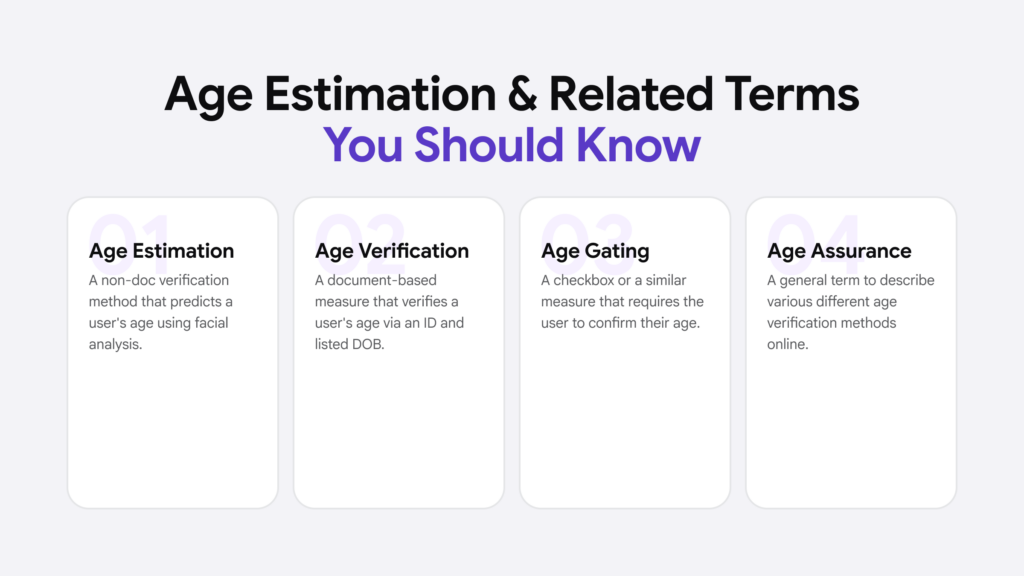
Since there are different age-restricted industries, from content platforms like OnlyFans to standard e-commerce shops that sell alcohol, various age assurance methods apply. For example, some adult-only sites in the US require the user to upload a government-issued ID photo, whereas Australia’s social media ban for minors pushes age estimation.
Age estimation, if allowed by local and industry-specific requirements, can be applied as an alternative to document-based age verification. It’s faster and, based on iDenfy’s current trends shown by our clients, converts at least 20% more users than other traditional doc-based age verification workflows.
An Example of a Common Age Verification Workflow
Let’s say an Australian social media app needs to enforce age estimation. This is how it would work typically:
- The system estimates the user’s age. It analyzes their selfie and confirms whether the person is over 16 to access the social media site. If the estimated age appears to be near the set limit, the user is asked to move to the second step. All adults and older individuals should always pass this process quickly and smoothly.
- The system forwards the user to an ID check (if applicable). It triggers a government-issued ID check that extracts the DOB and confirms the exact age this time, not an estimation. This type of age verification system also matches the face to the ID, confirming it belongs to the person.
-> This is considered a compliant, yet balanced age assurance workflow, which is risk-based, meaning that stricter ID document checks are only reserved for the minority.
| Age estimation | Document-based age verification | |
|---|---|---|
|
What it checks |
Estimates age from facial features in a selfie | Reads the date of birth from a government-issued ID |
| Results |
An estimated age range |
An exact date of birth |
| User input |
A selfie |
An ID document (+ selfie for face matching) |
| Speed |
Seconds, fully automated |
Longer (may involve document capture and review) |
| Friction |
Minimal |
Higher (requires the user to have an ID on hand) |
| Data used |
Facial image |
Identity data from the document |
|
Best used as |
The first-line check for the majority of users |
The fallback for inconclusive or borderline cases |
How Accurate are Most Age Estimation Systems?
Age estimation itself is exactly how it sounds: it ‘estimates’ the person’s age. That means most systems are very accurate, but not to the point that the accuracy rate reaches 100%. You just have to be realistic and accept that an older individual can be rejected as one “below” the set limit or younger than they actually are. If you hear otherwise during a sales call, there’s a huge chance the representatives aren’t being completely honest.
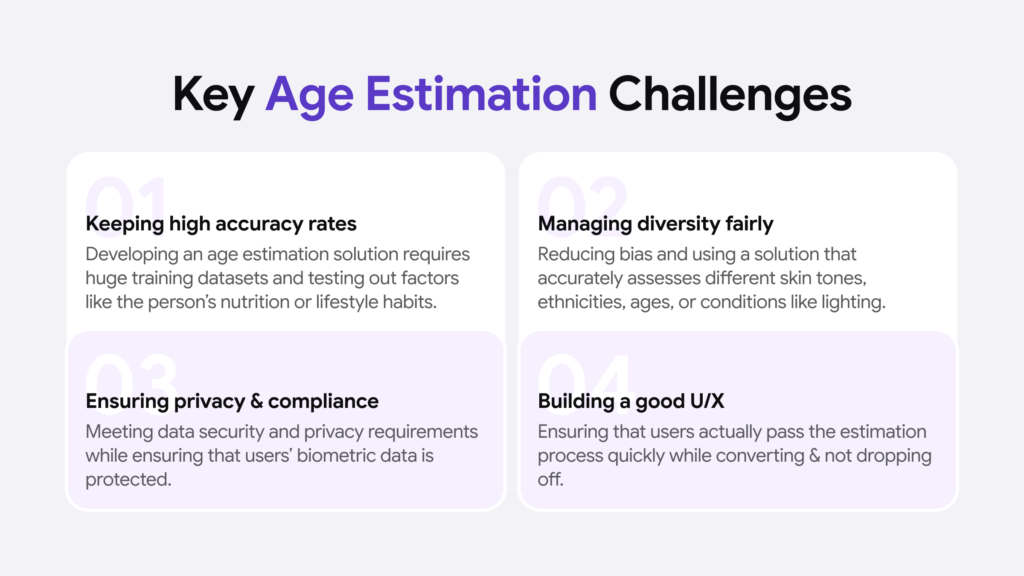
People aged 16-30 are always harder for any age estimation system to determine because genetics or certain lifestyle factors shape the way and how old their face looks.
These include aspects like:
- Stress
- Poor nutrition or sleep
- Smoking and alcohol
- Sun exposure and skin tone
- Body fat distribution (in terms of facial volume)
- Other medical conditions that affect the person’s facial appearance
And vice versa if the person generally looks younger than they actually are. Cosmetic procedures (like filler), hairstyle/hairline, facial hair (like a mustache), or makeup should also impact some systems. For this reason, if you’re looking for a new age estimation vendor, you should carefully assess the mechanics behind the system, how it was created and trained, and, naturally, test it out yourself in a Sandbox environment. If you’re still at the shortlisting stage, our breakdown of the best age verification software providers compares how the leading vendors differ in accuracy, supported age assurance methods, and pricing.
Related: Document Verification: What’s the Right KYC Automation Workflow?
What Regulators Say About Accuracy in Age Estimation
For example, Ofcom has issued guidance on protecting minors online and has set age estimation standards or four criteria:
- Technical accuracy
- Robustness
- Reliability
- Fairness
This sounds simple but is difficult in practice. Ofcom defines the “fairness” factor as the extent to which an age assurance method avoids or minimizes bias and discriminatory outcomes. As a bad example and illustration, Ofcom provided a facial estimation method producing lower accuracy for users of certain ethnicities. This is an outcome that can misclassify children as adults, or adults as minors.
“Age checks are most effective when they are built into multiple stages of the user journey.”
— Oliver Griffiths, Online Safety Group Director, Ofcom, letter to DSIT, 16 June 2026
This is why age assurance systems use buffer zones. If testing shows that the AI could mistake a 17-year-old for someone up to seven years older, the platform adds an extra safety margin. For an 18+ service, this means anyone who appears to be 25 or younger is asked to complete a stronger age check, such as a doc-based age check.
What are the Key Steps Used to Build an Effective Age Estimation Process?
Four stages complete a proper biometric age estimation check:
1. Image Capture
The initial step is the automated facial biometrics capture, which allows the user to frame their face and “record” their biometrics for the age estimation check. It depends on the concrete solution; however, head movements are optional, but there can be an approach that doesn’t prompt the user to do extra movements. For example, a recent NIST report on age estimation technology revealed that facial expressions, like smiling/frowning or blinking, can impact the capture’s accuracy.
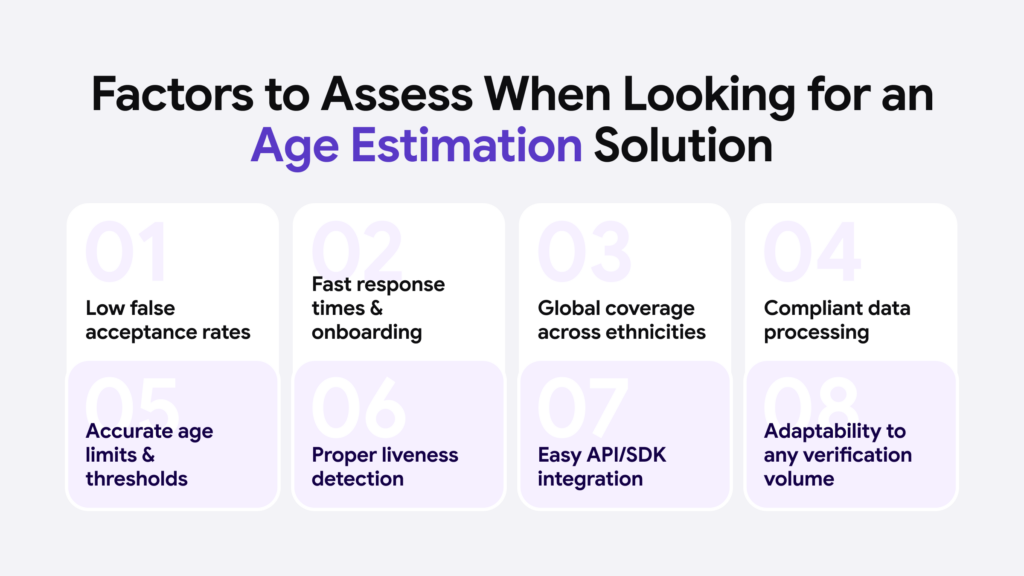
-> iDenfy’s age estimation workflow works in a similar manner: a person’s live selfie is used as the only input; no ID doc upload is required. You can also set a configurable age limit and buffer. That means near-threshold users are forwarded by the system to a standard ID doc check with an extracted exact DOB.
2. Age Estimation
This is the part where the captured selfie image during the first stage of the age estimation process is analyzed using AI and ML algorithms via a set mathematical order, trained to calculate the result/estimate. For example, it can be “over 18”. A very important note here is that age estimation doesn’t keep or store the user’s selfie. That means you don’t know what the user’s name is, but you have determined if they’re of age and if they can access your age-restricted services.
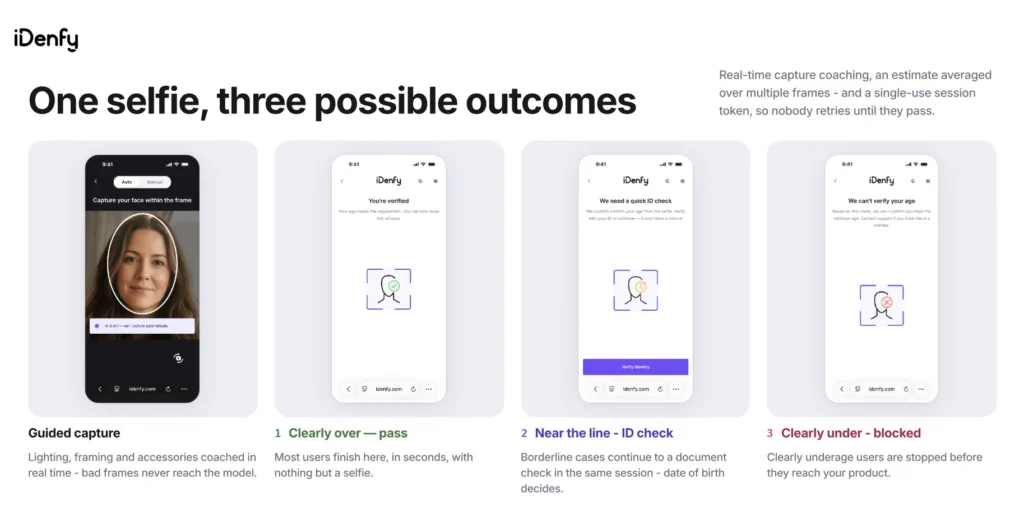
-> iDenfy’s age estimation solution works using the same principle. It reads facial features from the selfie and returns an estimated age as a result, accurate to within roughly the three-year range. That estimate is measured against an age limit and buffer zone that you configure based on your internal risk appetite and desired threshold, rather than forcing a fixed threshold, which doesn’t work for all use cases. That’s why the customization factor is vital, especially for large volumes and a faster scaling process.
3. Liveness and Security
Liveness in an age estimation check is designed to help spot presentation attacks (silicone mask, printed photo, etc.) and other spoofing mechanisms, which target the camera. For example, an underage person might be holding an older person’s printed photo or using a deepfake on a separate screen.
There are two types of liveness detection in age estimation:
- Active liveness. This includes asking the person to complete a simple action, like smiling or blinking, during the age estimation check.
- Passive liveness. This is considered a more seamless approach in terms of user experience because passive checks during age estimation analyze the skin texture, light reflections, and other risk signals, such as the background behind the person.
-> iDenfy’s age estimation is powered by liveness checks that run in the same age estimation workflow, verifying that the person is of age and, at the same time, ensuring security. This means guaranteeing that the person isn’t using any fraudulent bypassing attempts, like a replayed video, and is live and present during the check, all while maintaining a smooth experience to the end user.
4. Privacy and Data Retention
During a well-crafted age estimation process, the photo, or the selfie used to estimate the person’s age, is deleted, rather than kept and stored. There’s no audit trail of the person’s image, and the company handling the verification shouldn’t use it to train the system or to create future templates. Age estimation’s goal is to make a decision, not to verify the whole identity of another person. The estimation means the threshold is either met or not, without exposing biometric data since it’s not necessary. In other words, the platform handling the estimation doesn’t know who the user behind the screen is.
-> iDenfy’s facial age estimation deletes the photos and doesn’t retain biometrics used to assess the person’s age. This helps some users feel safer and adds a feeling that their data can’t be exposed to a breach because there’s ‘nothing’ to expose. Keep in mind that, in general, iDenfy is certified by ISO and holds the highest security standards when it comes to both biometrics and any other KYC-related info used for user onboarding and verification.
Related: Document Verification: What’s the Right KYC Automation Workflow?
How to Conduct a Facial Age Estimation Flow in Practice?
Most third-party systems allow you to customize the main factors, yet provide a template-like system that doesn’t require you to code or build everything from scratch.
From iDenfy’s perspective and our team’s personal experience when building the age estimation solution, you should be able to:
- Set the threshold. Fix the age limit to better assess the risk and weigh how much damage an inaccurate result can cause. The risk level/threshold means that you decide how strict your age estimation checks need to be.
- Don’t forget the buffer. The threshold needs to have a buffer that you set around it. Accuracy is weakest when it’s closest to the cut-off limit. A user estimated at 16 to 20 against an 18 limit should be routed to a stronger check, such as doc-based age verification, rather than passed or blocked entirely.
- Ensure good image quality. This also depends on the design of the flow and how well the end-user is guided throughout the whole age estimation process. If they don’t know how to put their face in the frame, or the fact that good lighting is needed, because your system doesn’t explain these details, your conversions will suffer.
- Add a backup workflow. If the results of the estimation are inconclusive, you should not risk it, meaning triggering the government-issued ID flow is the right way to go, especially in such sensitive cases, like age-restricted platforms. Other alternatives are reusable IDs or national digital IDs that are also non-document options, tailored to each country and its national, government-approved onboarding methods used in industries like banking or everyday services.
Other tips that I recommend: always track the errors and overall results. It can help you evolve and fix some common patterns, like inaccuracies when a certain age band or gender is trying to pass their age estimation. Document the progress. If you don’t want to do it yourself and have the capacity/budget, I recommend choosing a vendor like iDenfy. It’s easier for professionals to help you ensure you’re compliant with age verification and estimation standards in real-time, in every market, etc.
Also, don’t forget that fraudsters change, regulations change, and so should you. The only way to keep up is to perfect the age estimation process and actually improve your pass rates without messing with the mandatory regulation aspect.
Performing Age Estimation With iDenfy
iDenfy’s age estimation service is easy to use and consists of a few stages:
1. You Create the Session
Use the settings in the dashboard to generate the age estimation token. Set the:
- Minimum age
- Buffer threshold
- Whether uncertain users should be re-assessed and
- How many retries they get
-> iDenfy returns a session_url and an expiry time.
2. The User Takes a Selfie
Afterwards, the user is automatically redirected to their age estimation session where the system captures their face using a single selfie. This is where the magic happens, since the user isn’t overburdened with extra manual steps/required to enter any personal details, like their name. It’s the main step of the process, which is quick and easy, even for less tech-savvy individuals or those who haven’t completed an age estimation check before.
3. The System Estimates Their Age
The age estimation results in one of the three outcomes:
- Clearly above your minimum. That means the age estimation session resolves as “SUCCESS” and the user is through in seconds.
- Clearly below your minimum. The session shows that the person’s estimated age is “UNDERAGE”.
- Inside the buffer band. That means the model isn’t confident enough to call it, so nothing is guessed as the final estimation result. What happens next depends on you and your custom configuration: you can either escalate to an ID document check, or close the age estimation session as “UNCERTAIN”.
Other result tag outcomes: “FACE_MISMATCH” -> the user’s uploaded ID doc within the second alternative doc-based workflow didn’t match the selfie; and “ATTEMPTS_EXCEEDED” -> the user went above the limit and exceeded their retry attempts.
4. You Get the Result
iDenfy’s age estimation software sends the estimation outcome to your webhook, returning it through the API and redirecting the user to the URL, based on your configured settings for that outcome. You can review your session list and detailed results log for each check with the results tag and why, for example, a certain session was not successful.
What happens in the alternative, document-based age verification check:
When an uncertain user is detected, iDenfy’s age estimation system automatically triggers and asks them to complete a normal ID document check inside the same session.
Two things change:
- The buffer stops applying. That’s because the user’s ID document gives an exact date of birth. It’s compared against the minimum age that you’ve set earlier.
- The face is matched too. The portrait on the ID is compared against the selfie, which stops the user from bypassing this step with someone else’s ID.
From there, five things can happen:
- Document read and face matched (resolves as “SUCCESS” or “UNDERAGE”, based on the date of birth)
- Document rejected (the age couldn’t be established, so the session resolves as “UNCERTAIN”, and this is final; the user isn’t asked for another ID)
- Face didn’t match (resolves as “FACE_MISMATCH”, the final result)
- User backed out, or the step-up expired (the session is still available to complete, and the user can try again, based on your retry limit)
- Retry limit reached without a decision (resolves as “ATTEMPTS_EXCEEDED”)
A user’s ID can be successfully verified, and the face match can be approved as well (both for the estimation and the standard doc-based flow part), but you can flag the session internally on your behalf if you suspect potential fraud. This is beneficial for EDD or edge cases that your compliance team manages, requiring extra manual reviews or reporting.
-> For more details, I recommend looking through our documentation for the age estimation service.
🟣 Alternative age assurance methods that iDenfy has in its stack:
-> Shopify age verification & other no-code native integrations
-> Non-doc digital IDs, or eIDs, such as MitID or Smart-ID (various options are available, depending on the country)
-> Document-based age verification using a government-issued ID (16 000+ document types are supported)