With AI fraud storming the mainstream market, many regulated businesses are raising a white flag in the fight against tampering and document forgery. At least to some extent. Why? The answer is simple. Regulated industries, such as fintech or crypto, can’t accept only a one-layer Know Your Customer (KYC) onboarding process. Even if you’re using a legit document verification process that automatically extracts the user’s submitted government-issued ID doc, like a passport or a driver’s license, the system needs to be fraud-oriented. That means it needs to be able to detect tampering in seconds and should also be global and support multiple different documents from all over the world (for example, the US alone has a bunch of states and independent requirements, residence permits, etc.).
And not to mention the second KYC layer, which is often biometric verification and face-matching to see if the individual who presented the document is real and present. But it doesn’t stop there. Lengthy, complicated onboarding that doesn’t have any guided tips (such as how to position the document into the frame) simply costs you users. People have endless options now, and if signing up feels like a complex task that’s causing a headache, they’ll find an alternative platform that doesn’t. Lost conversions, lost funds.
Below, we explain the trends that a modern, automated document check needs to follow, and which factors are just a marketing tactic presented during Sales calls.
What is Document Verification?
Every time someone opens a bank account or registers on a crypto platform, their identity gets checked. This is a common security and a mandatory compliance process and part of KYC onboarding. In the last decade, the main step in this sign-up process, which is done remotely, is the submission of an ID document. A passport, a driver’s license, an ID card (basically, whatever the user submits has to be verified by KYC software), as real and actually theirs. That’s what modern, automated document verification is.
This matters most where money changes hands. In other words, any firm operating online and juggling funds needs to add KYC and document checks. Banks and crypto platforms can’t afford to take customers at their word. That’s how money laundering or other issues like account takeovers happen. Regulations require regulated platforms like this to confirm identities before doing business (the same principle applies for B2B relationships, but then the Know Your Business (KYB) verification process is applied and corporate docs are collected).
In practice, that often means using a third-party software, like iDenfy, and inspecting a document’s format, its built-in security features, and details like the machine-readable zone (MRZ), which encodes key personal details in a standardized, machine-scannable format.
The document verification process involves these stages:
- The customer wants to create a new account. They provide their personal data as part of the account opening process. Typically, the data includes the name, date of birth, address, etc.
- The customer additionally provides documents for verification. For instance, they may be asked to send a birth certificate to prove their age or include a utility bill for a form of address verification.
- The organization checks the provided details. They compare the sent details with the provided document to check if it’s authentic and not forged in any way.
- The organization decides if the document can be verified. If the verification is completed successfully and the document appears to be authentic, then the customer is deemed as legitimate.
Related: Top 5 Identity Verification Measures [For Beginners]
Automate your KYC process
iDenfy verifies customers from 200+ countries in seconds. AI-powered, compliant, and trusted by 1,000+ companies.
Explore KYC SolutionWhich ID Documents Can Be Verified?
Modern document verification systems support most government-issued and official documents. That includes:
- Driver’s licenses. In some cases, for example, car-sharing apps rely on this document as the primary form of identity proofing and often have smooth, specifically designed driver’s license verification flows to check if the user is of age and has a valid driver’s license to access a vehicle.
- Passports. This is considered the most universal form of ID on a global level. All KYC systems accept passports, both for user onboarding and as part of age verification, if it requires capturing the user’s DOB from the uploaded doc.
- ID cards. This is more common in Europe, as it’s easier to carry with you compared to a passport due to the convenient size of the national ID card. However, regulations like eIDAS govern alternatives or non-document verification methods through digital/eIDs.
- Visas and residence permits. Most solutions also accept these documents during KYC onboarding, especially relevant in cases when people change countries or reside in another country due to university, work, etc.
Other documents often fall into the corporate documentation category, which is needed for Business Verification or KYB onboarding. This includes all sorts of documents, like incorporation certificates, utility bills, or Articles of Association, paired with other verification methods, depending on the jurisdiction and concrete use case. That’s how automated verification systems extract and cross-reference different documents against external databases in real-time, making the experience relatively smooth for the end user.
What are the Different Types of Document Checks?
There are a few types of document checks that businesses choose to implement. For example:
- Automated software. Uses algorithms and machine learning to analyze documents and compare them with existing databases.
- Manual checks. Reviewing documents to ensure they’re valid and match the information provided by the individual.
- Third-party providers. Often offer more advanced ID verification solutions, including facial recognition, liveness detection, biometrics, and other innovations.
The key difference between physical document verification and digital document verification is the method used. Physical checks examine a document’s tangible attributes, such as the MRZ zone, while digital checks utilize automation to verify the document’s authenticity online.
How Do I Know If I Should Stick to Manual or Switch to Automated Doc Checks?
It’s a simple answer. If you have large volumes of users and transactions that you need to handle, you’ll probably save a lot of time and costs by implementing a third-party KYC service provider. The most reliable option for both good U/X and global document coverage (with the focus on compliance and fraud prevention, of course). KYC providers have the tools if you want to scale in the future. Extra checks, like address verification (relevant in industries like crypto), can be easily added without you having to cover separate integration costs or service agreements.
The technology handles the variation. This includes different document layouts, languages, and checking security features when the user just takes a photo and waits a few seconds for a result. In general, digital document verification requires online data extraction and comparison. All modern KYC verification systems use this flow. This is how these processes typically look:
- Document data extraction. When a user submits a document for online verification, companies must access the information contained within the document. They automatically extract the data through various methods, such as pattern recognition or optical character recognition (OCR).
- Document data comparison. After organizations extract the data, they compare it to the user’s information.
That said, if you’re a smaller company with a proper dev team, you can either build this sort of system in-house and handle the document checks partially manually. This costs more. Lastly, the only option for fully manual, traditional ID document verification is valid for industries like alcohol and retail, where a walk-in shop sells this sort of stuff, and the staff needs to verify the buyer’s age over the counter.
Popular Types of Document Verification
There are slightly different methods for verifying documents online. However, if you want a good user experience, you’ll probably want to use these ones:
1. Auto-Capture of Personal Details Using an ID
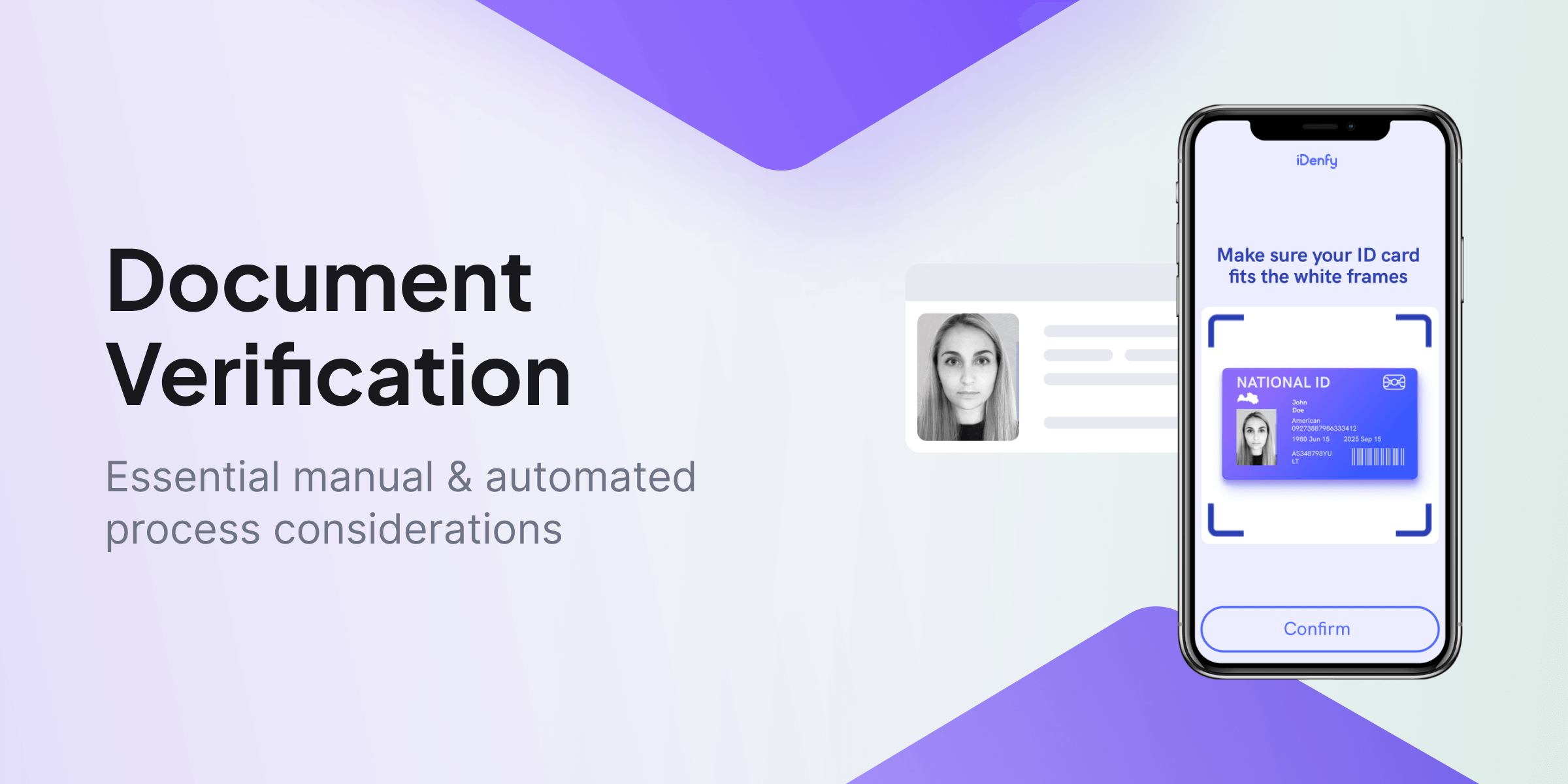
This is the initial step and the most important stage. The document verification system first needs to access a usable image of the user’s ID document. Otherwise, it’s not possible to extract personal information and actually verify it. This is where the “auto-capture” part is important, since it handles this task automatically and detects the user’s document in the provided frame. It’s important to use a system that has a good UI, and the user isn’t asked to manually photograph their document and press the shutter button.
This way, auto-capture ensures the document is correctly placed and ready for the system’s processing before it reaches the extraction stage. Blurry images, where the user places the document outside the frame or uses a light that reflects on the document and then causes OCR to misread key personal detail fields, result in poor conversions and lost users. That’s why auto-capture works best with documents that have visible corners, for example, ID cards and single passport pages.
2. Extraction Using Optical Character Recognition (OCR) Technology
OCR scans the document that was previously provided by the user in the frame. The technology extracts the text and the image from it, identifying the document type. Analysts who are working with KYC verification and onboarding the user who provided the document then see the logged details and extracted fields in the dashboard. If something doesn’t go according to plan from the user’s side, there will be a denied reason, with error codes like “blurry”.
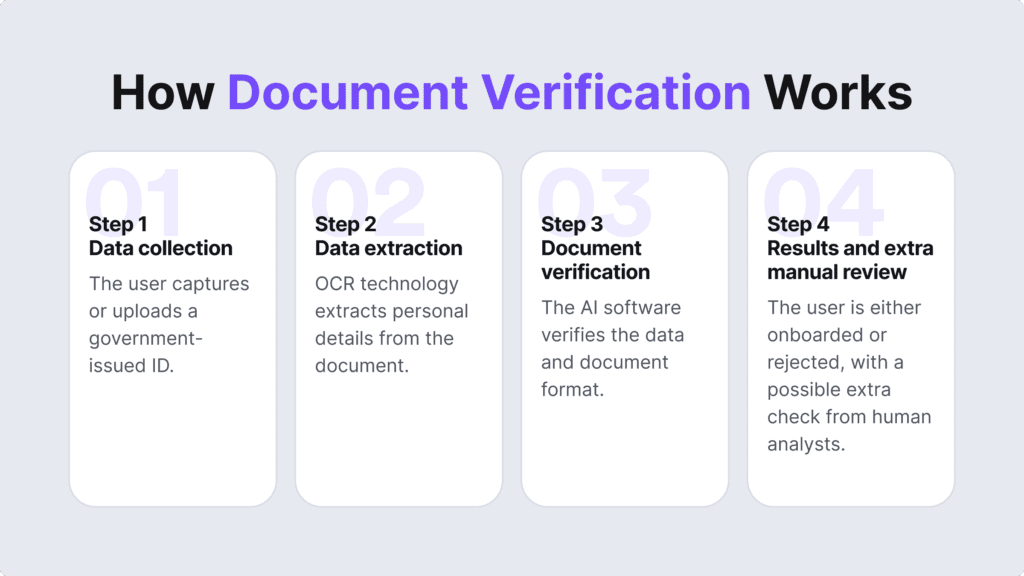
For example, some systems automatically redirect the user to a different flow or run a background/database scan that cross-references their name, date of birth, and document number (especially if the OCR reads these details incorrectly). That’s why it’s also important to check the accuracy and test out KYC service providers and their OCR technology capabilities in sandbox environments and see if they are able to recognize different document types (including layouts and fonts) correctly and fast, to remove the friction for the user completing the document verification flow.
3. Extra Selfie Biometrics
ID doc + database cross-checking can be the final onboarding flow. However, a very popular approach in high-risk regulated industries is ID document + biometric verification, or selfie verification. This dual-layered system can then check if the extracted picture from the government-issued ID is legit and matches the person completing the biometric stage of the onboarding (their biometric traits, aka their face captured using their phone, match the photo on the document).
This way, document verification and the whole onboarding process are completed, and the user’s details are verified. This typically takes under two minutes, depending on the flow and the submitted documents (sometimes, source of funds or bank account verification, apart from address checks, can be added in the financial sector). This helps determine if there is no tampering, if the document is valid, etc. The selfie step is very effective against deepfakes since AI has changed this trend for the worse in terms of attempts to bypass KYC.
The Main Reasons Why Businesses Invest in an Automated Document Verification Process
Document verification doesn’t revolve only around IDs. Many businesses use this verification process due to its reliability (it holds the user’s picture as well as their full name, sex, and sometimes address (depending on the doc type and the issuing country). Capturing the user’s ID can be a form of age verification as well, and to this day, it’s considered to be the most effective method, compared to age gates or age estimation, where the software estimates the person’s age but doesn’t rely on legit data like their document and registered DOB.

But. Like with every step in the onboarding process and every solution, there are limitations. A poor example of a document verification solution is one that doesn’t allow the user to choose their preferred device, they need to upload a photo instead of showing the document to the camera (the system needs to capture the ID on their own for a better U/X), there are no tips on how to hold the document (all corners need to be in the frame and the lighting needs to be proper, for example), etc. If your onboarding looks something like this, you probably have a not-so-perfect conversion rate, not to mention the fraud aspect of the system.
If you want to avoid friction and KYC verification delays that directly impact the user experience, you need to find a proper, automated, OCR-based document verification solution. It helps:
- Onboard more users, often, in under a minute
- Check all security features of the doc, which often can’t be properly inspected with the human eye
- Cross-reference the extracted KYC data (sometimes, with other KYC layers, preferably a trusted government database, like an AAMVA check for driver’s license verification)
- Reduce human errors and the overall workload for analysts (who can then focus on EDD and edge cases, not all low-risk, genuine users with legit documents)
- Minimize fraud rates at the initial onboarding stage (before the user gets to link their bank account and start making transactions)
A fintech platform onboarding users across multiple markets, or a crypto exchange dealing with customers in dozens of jurisdictions, can run the same verification process regardless of where the user is or what document they’re submitting. So, simply said, the businesses getting this right aren’t just reducing friction.
Which Industries Use Document Checks for ID Verification?
Financial institutions and similar service providers use document checks, among other obliged companies, for example:
- Fintech companies
- Investment firms
- Insurance companies
- Credit unions
- Real-estate firms
- Crypto exchanges
- Banks
Using document verification checks helps them fulfill regulatory obligations, reduce fraud risks, establish trust, and streamline customer onboarding processes.
Factors Helping Businesses Choose Document Verification Software
As much as we’d like to simplify this matter, there’s no such thing as a single template for document verification, especially when we talk about ID verification and customer onboarding. To choose the right identity verification types and providers, you must consider several factors, asking yourself such questions:
Does the potential IDV service provider support global document coverage? How easy is the implementation process? How many languages are there? What are the costs? Is there a real human manual verification team as well? And so on.
You must have knowledge about where your organization operates, the regulatory compliance requirements, and your customers’ risk profiles. But don’t worry, iDenfy’s team can help you build a proper onboarding process tailored to your needs.
We offer post-sale support, white-label options, an internal KYC specialist team for manual verification checks, additional AML Screening Software integrated with identity verification, Proof of Address Verification, customer risk scoring, and more tools – all in one place.
Get started today!