Last updated: July 2026
WordPress powers over 43% of the web — which means it powers a huge variety of sites that need identity verification: membership communities, age-restricted content platforms, ecommerce stores, and regulated service providers. iDenfy’s WordPress plugin adds real KYC in minutes, with zero ongoing maintenance.
WordPress is general-purpose software, which means it serves radically different use cases. A membership platform for a professional community has completely different identity verification needs than a WooCommerce store selling age-restricted supplements — but both run on WordPress, and both need a verification plugin that can be configured to the specific use case without custom development.
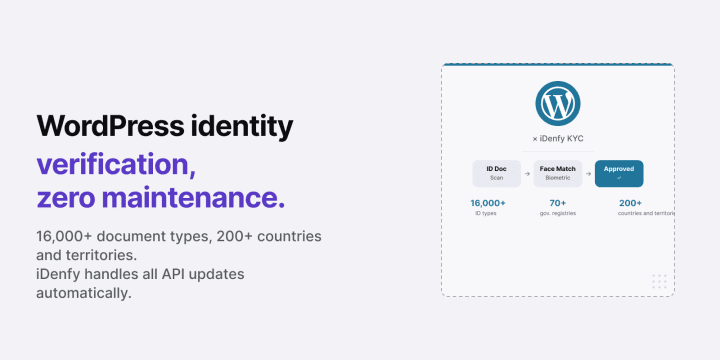
Bottom line: iDenfy’s WordPress identity verification plugin installs in minutes via the standard plugin interface, connects to iDenfy’s API with your credentials, and adds document-based identity verification, biometric face matching, and 3D liveness detection to any page, registration flow, or checkout trigger you configure. It supports 16,000+ ID document types from 200+ countries and territories and territories, and iDenfy handles all API maintenance automatically — there is no ongoing plugin upkeep on your end.
Who this is for — and what it’s not. For WordPress site owners — membership platforms, content publishers, community operators, ecommerce store owners — who need verifiable customer identity at sign-up, login, or specific content access points.
Not a WordPress general plugin guide or a site security overview. For a full KYC vendor comparison, see Best KYC Providers.
Where WordPress Sites Need Identity Verification
WordPress’s flexibility means identity verification requirements appear in many different contexts:
- Age-restricted content. Adult content platforms, alcohol e-learning portals, cannabis education sites, and regulated media platforms need to verify that users are above the age threshold before accessing content — not just ask them to click a checkbox.
- WooCommerce stores selling regulated products. If your WordPress site runs WooCommerce and sells age-restricted or regulated products, identity verification integrates at the checkout level. See the WooCommerce integration page for store-specific configuration.
- Regulated service providers. Legal, financial, healthcare, and professional services offered through WordPress portals face regulatory KYC obligations. A client portal for a regulated business cannot rely on email verification to confirm client identity.
- Anti-spam and community fraud prevention. High-traffic communities, marketplaces, and platforms that have experienced coordinated account creation abuse use identity verification as a hard gate — one real identity, one account.
Related: Identity Verification for E-Commerce: Full Overview
Automate your KYC process
iDenfy verifies customers from 200+ countries in seconds. AI-powered, compliant, and trusted by 1,000+ companies.
Explore KYC SolutionWhat iDenfy’s WordPress Plugin Verifies
The iDenfy WordPress plugin embeds a full KYC flow into your site. The verification widget renders inline — users never leave your domain during the process.
Core capabilities:
- Document verification. The user photographs their government-issued ID. iDenfy validates it against 16,000+ document templates from 200+ countries and territories and territories — checking authenticity, expiry, and data extraction. Supported documents include passports, national ID cards, driver’s licenses, and residence permits.
- Government registry cross-check. Where available, iDenfy cross-references extracted document data against 70+ national government databases to confirm the document reflects a real registered identity.
- Facial recognition with 3D liveness detection. The user takes a selfie. iDenfy’s biometric system checks for liveness (rejecting photos, masks, and digital renderings) and matches the face to the document photo.
- iDenfy HUB integrations (optional). The plugin connects to iDenfy’s broader verification ecosystem — adding AML screening, proxy/VPN detection, phone number verification, proof of address, and fraud risk scoring as needed for your use case.
How to Install iDenfy on WordPress
The plugin is available through the WordPress.org plugin directory and installs through the standard WordPress admin interface:
- Install the plugin. Go to WordPress Admin → Plugins → Add New → search “iDenfy” → Install and Activate. Alternatively, download the zip from WordPress.org and upload it manually.
- Add your API credentials. In the plugin settings, enter your iDenfy API key and API secret from your iDenfy dashboard. The plugin handles authentication automatically.
- Configure trigger points. Select which registration forms, page access points, or user roles require verification. The plugin integrates with standard WordPress user registration hooks and popular membership plugins.
- Set verification requirements. Choose which verification components are required for your use case — document-only, document plus face match, or full liveness detection.
- Test in sandbox mode using iDenfy’s test environment, then activate production mode.

iDenfy pushes all API updates automatically. There is no maintenance work on the WordPress side after initial setup — no version checks, no endpoint updates, no breaking changes from iDenfy’s backend.
Related: 5 Key Customer Onboarding Mistakes Costing Your Business Growth
Compatibility with WordPress Membership and Community Plugins
iDenfy’s WordPress plugin connects to iDenfy’s verification API, which means it can be triggered at any standard WordPress hook — including those exposed by major membership and community plugins. Common integration points include:
- Registration forms — standard WordPress registration, WooCommerce account creation, and custom form plugins (Gravity Forms, WPForms, Contact Form 7).
- Content access gates — pages or posts set to require verification before the content is rendered. Unverified users see a prompt; verified users see the content.
- Membership tiers — integrate with MemberPress, Restrict Content Pro, or LearnDash to gate specific tiers or course access behind a verification requirement.
- WooCommerce checkout — for product categories that require age or identity verification at purchase, the plugin triggers within the standard WooCommerce checkout flow.
For custom integrations beyond these standard hooks, iDenfy’s REST API and JavaScript SDK are available.
Zero-Maintenance API Management
One of the practical advantages of iDenfy’s WordPress plugin over self-built API integrations is the maintenance model. When iDenfy updates its API — new document templates, improved liveness models, new country support — the changes propagate automatically without any action required from your WordPress admin. The plugin abstracts the API entirely, so your verification flow improves over time without engineering effort.
This is a meaningful difference for small teams. A self-managed API integration requires someone to monitor API changelogs, test against new versions, and push WordPress updates. iDenfy’s plugin eliminates that overhead entirely.
Compliance and Certifications
iDenfy holds the following certifications and compliance standards relevant to WordPress deployments in regulated environments:
- GDPR and CCPA compliant — data processing agreements available
- ISO 27001 certified — information security management
- SOC 2 Type II certified — service organization controls
- iBeta ISO 30107 certified — biometric liveness detection standards
- Lloyd’s of London cyber insurance — up to $500K coverage on enterprise plans
WordPress Age Verification Plugin
Age verification is one of the most common reasons teams add iDenfy’s WordPress plugin. The use case is distinct from identity verification: you’re restricting access to age-gated content — alcohol and vaping product pages, adult content, cannabis services, gambling portals — not just verifying compliance records. iDenfy’s WordPress age verification plugin handles this without a separate age-gate tool.
Three trigger approaches are supported:
- Page-level gate. Specific pages or post categories require age verification before the content renders. Verified users pass through on return visits without being interrupted again — status is stored on the WordPress user account.
- Registration gate. New account sign-ups require a document-based age check before the account activates. Date of birth is extracted from a government-issued ID — not a self-declaration form — in 0.02 seconds.
- WordPress age verification popup. An overlay triggers on first visit, prompting the user to verify before accessing restricted content. Unlike a simple date-of-birth popup, iDenfy checks the actual ID document, satisfying the “authoritative source” standard most regulations require.
For WooCommerce sites on WordPress, the plugin also integrates at checkout — restricting purchase of age-restricted product categories to verified users only. The age verification plugin for WordPress works with any theme and any page builder that uses standard WordPress hooks.
Related: Age Verification Integration: Step-by-Step Guide
Pricing
iDenfy’s WordPress plugin uses the platform’s standard pricing. Self-serve plans start at $1.35 per verification (Basic tier, $135/month minimum) — accessible immediately after signing up, with no sales call required. For sites with higher verification volumes or compliance-sensitive requirements, the Enterprise tier starts from $0.55 per approved user with a $625/month minimum.
See full pricing at the iDenfy pricing page.
Read More Articles
Ready to add identity verification to your WordPress site? Install iDenfy’s WordPress plugin — or contact the team for a custom enterprise setup.