Last updated: July 2026
Shopify gives you a storefront in minutes — but if you sell age-restricted products, high-value goods, or operate in a regulated market, a storefront is not enough. This guide covers how to add identity and age verification to your Shopify store with iDenfy’s plugin, and what it actually checks.
Shopify is the most popular ecommerce platform on the planet, which also makes it one of the most targeted. Merchants selling alcohol, vaping products, firearms accessories, luxury goods, or financial services face a real compliance problem: Shopify’s native tooling does not verify who your customers actually are. A date-of-birth checkbox is not age verification. A billing address is not identity verification.
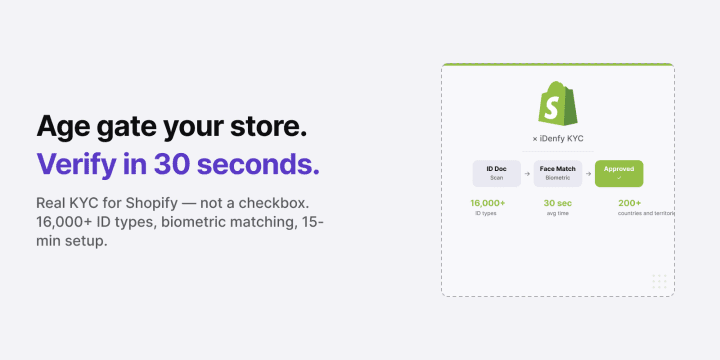
Bottom line: iDenfy’s Shopify identity verification plugin adds real KYC — document capture, biometric face matching, and liveness detection — directly into your checkout flow. Setup takes approximately 15 minutes. Verification takes an average of 30 seconds per customer. The plugin supports 16,000+ ID document types across 200+ countries and territories and territories, and you pay only for approved, verified users.
Who this is for — and what it’s not. For Shopify merchants selling age-restricted products, high-value items, or operating in regulated industries who need real identity verification at checkout or sign-up — not just a consent checkbox.
Not a guide to Shopify store setup or general ecommerce fraud prevention. For a broader overview of KYC options, see Best KYC Providers.
Why Shopify Merchants Need Identity Verification
Most Shopify fraud prevention focuses on payment fraud — stolen cards, chargebacks, shipping address mismatches. Identity verification is a different problem. It answers a different question: not “is this card legitimate?” but “is this customer who they say they are, and are they legally allowed to buy this?”
That question matters in three specific situations:
- Age-restricted products. Alcohol, tobacco, vaping products, adult content, certain supplements, and firearms accessories all carry minimum age requirements that vary by jurisdiction. A checkbox asking “are you 21?” does not comply with UK Alcohol Act enforcement, EU distance selling rules, or US state-level age verification laws. Real age verification extracts date of birth from a government-issued ID.
- High-value goods and high-risk orders. Luxury watches, designer goods, and collectibles attract fraud through account takeover and synthetic identity attacks. Biometric face matching ties the buyer to the document, not just the payment credential. Shopify’s own high-risk order flags tell you something looks wrong — identity verification tells you who the person actually is. See High-Risk Orders on Shopify: What to Do for how the two layers work together.
- Regulated seller onboarding. Marketplaces and multi-vendor Shopify stores that onboard third-party sellers need to verify who those sellers are before they can list products — especially for DAC7 compliance in the EU, which requires platforms to collect and report seller identity data.
Related: Identity Verification for E-Commerce: Full Overview
Automate your KYC process
iDenfy verifies customers from 200+ countries in seconds. AI-powered, compliant, and trusted by 1,000+ companies.
Explore KYC SolutionWhat iDenfy’s Shopify Plugin Does
The iDenfy Shopify plugin adds a fully managed KYC flow to your store without custom development. You control when verification triggers — at account creation, before checkout, or post-purchase for restricted categories — and iDenfy handles everything that happens inside the flow.
What the plugin verifies:
- Document authenticity. The customer photographs their ID — passport, driver’s license, national ID card, or residence permit. iDenfy checks the document against 16,000+ supported templates from 200+ countries and territories and territories, looking for tampering, forgery indicators, and expired documents.
- Age from document. Date of birth is extracted from the ID in approximately 0.02 seconds. Age gate logic runs automatically — if the customer is below your configured threshold, the flow stops.
- Biometric face match. The customer takes a selfie. iDenfy’s 3D liveness detection confirms the person is physically present (not a photo or mask), then matches the face to the ID document photo.
- Bank verification (optional). For high-value purchases, bank login validation can be added as an additional layer, tying the buyer’s payment account to their verified identity.
Results are stored in your iDenfy dashboard with a full compliance audit trail — session status, document scans, face match result, and timestamps. If you ever face a chargeback dispute or regulatory inquiry, the record is there.
How to Add iDenfy to Your Shopify Store
Setup requires no custom code. The integration is available as a native Shopify plugin with an estimated 15-minute configuration time.
- Install the plugin from the Shopify App Store and activate it in your admin panel.
- Connect your iDenfy API credentials in the plugin settings — your API key and secret are available from your iDenfy dashboard.
- Configure trigger conditions — choose whether verification fires at account creation, at checkout for specific product tags, or for orders above a defined value threshold.
- Set your age threshold if selling age-restricted products — the plugin enforces the minimum automatically based on extracted date of birth.
- Customize the verification flow — button text, color, redirect behavior after verification — to match your store branding.
- Go live. iDenfy handles API updates and compliance maintenance with zero ongoing development on your side.

The plugin is compatible with Shopify’s standard and Plus plans. For high-volume merchants or custom flow requirements, API integration is also available.
Related: Digital Onboarding: How to Onboard Customers Without Friction
Shopify Fraud Prevention: Where Identity Verification Fits
Shopify fraud prevention typically means payment-layer tools — Shopify’s built-in risk scoring, chargeback protection apps, address verification. These tools ask: “is this transaction legitimate?” Identity verification asks a different question: “is this person who they claim to be?”
The two layers solve different problems and work best together. Shopify’s fraud detection flags high-risk orders based on transaction signals. iDenfy’s identity verification confirms the buyer’s identity at account creation or checkout — so when a high-risk flag fires, there’s a verified identity behind the order, not just a card number.
Specific fraud scenarios where identity verification adds what payment fraud tools can’t cover:
- Account takeover (ATO). A stolen account used to place an order passes standard fraud scoring — the account history is clean. Biometric face match at checkout confirms the person logging in is the account holder.
- Synthetic identity fraud. Fabricated identities pass address verification and card checks. Document verification against 16,000+ ID templates catches forged or manipulated documents.
- Age verification for regulated products. A minor using a parent’s card passes payment fraud tools. Document-based age extraction blocks them at the ID check before checkout completes.
As a Shopify age verification app, iDenfy installs directly from the Shopify App Store with no custom development. See High-Risk Orders on Shopify for how to use both fraud prevention layers together.
Shopify Age Verification: The Regulatory Picture
Age verification requirements for online sales vary by jurisdiction and product category, but the direction of regulation is consistent: self-declaration is no longer sufficient in most markets, and documentary evidence of age is increasingly required.
- UK: The Online Safety Act and existing alcohol licensing law require robust age verification for regulated products. The BBFC’s Age Verification Guidance specifies that verified age checks must rely on authoritative sources — not self-declaration.
- EU: The Digital Services Act (DSA) imposes due diligence obligations on platforms regarding age-gated content, and EU distance selling rules apply age restriction enforcement obligations to merchants.
- US: State-level laws govern age verification for tobacco, alcohol, cannabis, and firearms accessories. Requirements vary significantly by state and product category.
iDenfy’s document-based age extraction satisfies the “authoritative source” standard required by most frameworks — the age comes from a government-issued ID, not from what the customer typed.
Related: Age Verification: Regulations, Methods, and Best Practices
iDenfy Shopify vs Alternative Approaches
| Capability | Date-of-Birth Checkbox | Credit Card Age Check | iDenfy Shopify Plugin |
|---|---|---|---|
| Regulatory compliance | No | Partial | Yes |
| Actual age extracted from ID | No | No | Yes (0.02 sec) |
| Liveness detection | No | No | 3D liveness |
| Fraud prevention | None | Limited | Full biometric match |
| Compliance audit trail | No | No | Full dashboard log |
| Setup time | Minutes | Varies | ~15 minutes |
| International document support | None | None | 16,000+ types, 200+ countries and territories and territories |
Pricing
iDenfy’s Shopify integration uses the same pricing structure as the rest of the platform. Self-serve plans start at $1.35 per verification on the Basic tier, with a $135/month minimum. Enterprise plans — which include pay-per-approved billing (no charge for failed or abandoned verifications), a dedicated account manager, and SLA guarantees — start from $0.55 per approved user.
The pay-per-approved model matters specifically for ecommerce: if a customer fails verification because they are underage or the document is fraudulent, you are not charged. You pay only for verified, approved customers.
Use iDenfy’s savings calculator to estimate your cost per verified user. Full pricing details are on the iDenfy pricing page. For high-volume Shopify stores, contact the iDenfy team for a custom rate.
Read More Articles
Ready to add real identity verification to your Shopify store? Install iDenfy’s Shopify plugin — or contact the team for a custom enterprise quote.