A corporate registry in Know Your Business (KYB) compliance is a very important tool, helping access government databases required to verify other entities. Businesses use these corporate registry checks during KYB onboarding to confirm the entity is legitimate. After extracting and cross-referencing details taken from a corporate registry, such as Companies House in the UK, you can compile a KYB report.
Many KYB software providers, including iDenfy, offer automated access to corporate registries, which means that you can use a single tool to check multiple databases without having to google or struggle to access gated or non-existent databases. Such tools also have an automated option to download KYB reports, compiling all the necessary information about a company in one document.
Analysts then save time and can make the final decision more quickly, whether to onboard the company or investigate further. But the real issue is that company registries differ, and some countries provide fragmented ownership or financial details. Others, such as the British Virgin Islands, are closed off to the public and have a limited search function.
I look into the main challenges of fragmented KYB data, explaining how to get your hands on official government registry data with detailed KYB reports more efficiently.
How Does KYB Verification Work?
KYB verification is the process of checking another company to assess whether it’s legally operating and is legitimate by verifying important KYB data, such as registration details, beneficial ownership information, and financial health. KYB, or Know Your Business, compliance essentially covers multiple aspects, including Anti-Money Laundering (AML) screening and checking the entity against sanctions lists.
For KYB verification, analysts often check a government registry to:
- Confirm a company’s legal status
- Identify its directors and ultimate beneficial owners (UBOs)
- Review available financial statements or credit bureau reports to assess its financial stability
Companies conduct KYB verification before starting a new business relationship to both ensure compliance and prevent risks, such as partnering with a fraudulent entity that facilitates illicit transactions or has hidden directors who are sanctioned.
Related: How Complex Corporate Structures Conceal True Ownership [KYB Guide]
Verify businesses, not just people
Automate company verification, UBO checks, and business due diligence with iDenfy KYB.
Explore KYB SolutionHow Does a Corporate Registry Check Work?
A corporate registry check is a lookup process that’s designed to allow analysts working on KYB onboarding to check official government records, aka a government-run business register, for details about another company. Well-known examples include the Handelsregister in Germany, Companies House in the UK, or Secretary of State (SOS) filings in the US.
Most registries provide these standard company details, but the extractable information varies by country
| Registry data returned | What it shows during KYB verification |
|---|---|
| Legal name and trading names | Whether the company’s registered name matches the application and whether any trading names are declared |
| Registration number | A unique company identifier used to match records across different sources |
| Legal form | The company’s legal structure, such as LLC, Ltd, GmbH, SA, or a partnership |
| Incorporation date | When the company was legally established and how long it has existed |
| Company status | Whether the company is active, dormant, dissolved, or in liquidation, depending on the registry’s classifications |
| Registered address | The company’s official registered address and whether it requires further checks, such as verifying its legitimacy or identifying a shared address |
| Directors and officers | Who is officially appointed to manage or represent the company |
| Shareholders | Who owns shares in the company and, where available, their ownership percentages |
| Beneficial owners (UBOs) | The natural persons who ultimately own or control the company, where this information is available |
| Filing history and accounts | Whether required filings appear up to date and whether financial statements are available for review |
Corporate registries in KYB compliance help verify three key things:
- The company’s existence. This helps check if the company is legally registered and if its representative’s provided company name and registration number match the registry records.
- The company’s status. This helps verify if the company is active and not dissolved or in liquidation. Some businesses buy a shelf company that has been sitting around for a longer period of time as a way to buy an already established entity and bypass some stricter checks that are implied for new businesses in terms of licensing or getting in contract with a payment provider.
- The company’s control structure. This helps go one step further and check the directors, officers, and shareholders of the verifying company if the register has this information declared. If not, you’re responsible for collecting this information for KYB verification via a separate flow, often asking the company’s representative to provide this information directly or via a custom questionnaire, such as iDenfy’s built-in KYB software feature.
Nominee directors are considered a threat in KYB compliance, for example, because they can show a name on a registry while the real decisions are made by an undisclosed beneficial owner who actually controls and owns the company.
Why are Corporate Registry Checks Important in the Context of KYB Data?
Using corporate registry checks helps assess already collected information about a company. This step is important because it confirms whether the KYB data is correct or not, detecting inconsistencies and missing details. Declared company data can differ from official corporate registry records, and you need to make sure that the company fits your risk appetite and compliance requirements before approving this new B2B relationship.
To collect KYB data, in practice, means going through several steps, such as:
- Collect standard details, like business name, address, registration number, and ownership information
- Look up corporate registries to compare and cross-match extracted company data
- Flag risks, such as missing information, possibly hidden ownership structures and mismatches that require extra manual due diligence and further assessment
- Make the decision to approve and onboard the company, deny its KYB application, or request additional documents/escalate for further investigations

After you onboard the business, ongoing monitoring can be used to continue to monitor potential changes in the company’s risk profile, such as changes in ownership. That’s why corporate registry checks can be used after onboarding, as well as a repeated tool to see if any new risks arise.
Related: 6 Steps to Conduct a KYB Verification Check [Guided Explanation]
Common Issues With Government Registry Data During KYB Verification
The narrative that KYB verification is a complex process is valid even when describing the challenges linked to registry checks. These include:
1. No Unified, Single Global Company Register
Each country has its own format, language, and registry access rules based on separate national/regional systems. In the US, for example, each state has its own corporate register because businesses are required to register at the state level.
“Every registry provides whatever information it holds. In Lithuania, you might not get shareholder data; in Germany, you will. The connection is the same, but what you actually get back is different.”
Robert Kotov, Head of Partnerships at iDenfy
For example, a company registered in Spain might be owned by a holding company in the Netherlands, which is in turn owned by an entity in another jurisdiction. Depending on where the entity is incorporated, compliance teams need to review and use multiple different databases.
2. Uneven Information, Including Access to UBO Data
Some corporate registries have detailed records and mandatory requirements to file ownership structure information (for example, Companies House), while others have limited company records. That means shareholder and UBO details aren’t publicly listed in every case, pushing analysts to dig deeper and consult additional sources.
If a company has not filed updated details or the registry has not processed them yet, once they change, you might not catch such recent changes unless you use the right KYB automation solution. In a more traditional sense, manual checks and, especially not skipping the filing dates and supporting documents, help analysts get their hands on up-to-date KYB data.
3. Gated Records Require Individual Requests
There are corporate registries that charge for each access to a company profile, such as Singapore’s ACRA. Companies House charges for extra detailed reports and certified copies of documents. In other cases, analysts need to submit requests, which makes the document retrieval process lengthy, compared to automatically accessing official government records and downloading a PDF report on the same KYB dashboard.
So, in this sense, automation and some sort of tool are inevitable when it comes to large volumes. For example, FTMO used iDenfy’s custom Questionnaire feature via the KYB dashboard and managed to automate the UBO identification and verification process. This resulted in saving at least 40 hours weekly, giving analysts more time to focus on edge cases only.
What are the Key Types of KYB Reports for Corporate Registry Data?
After using corporate registries to cross-check company information, typically using the same KYB software, such as iDenfy, that automates access to those registries, you can compile and download a KYB report.
It depends on the solution you’re using, but the key types of KYB reports include:
- Government registry reports
- Credit bureau reports
- AI-generated company reports (w/ custom data)
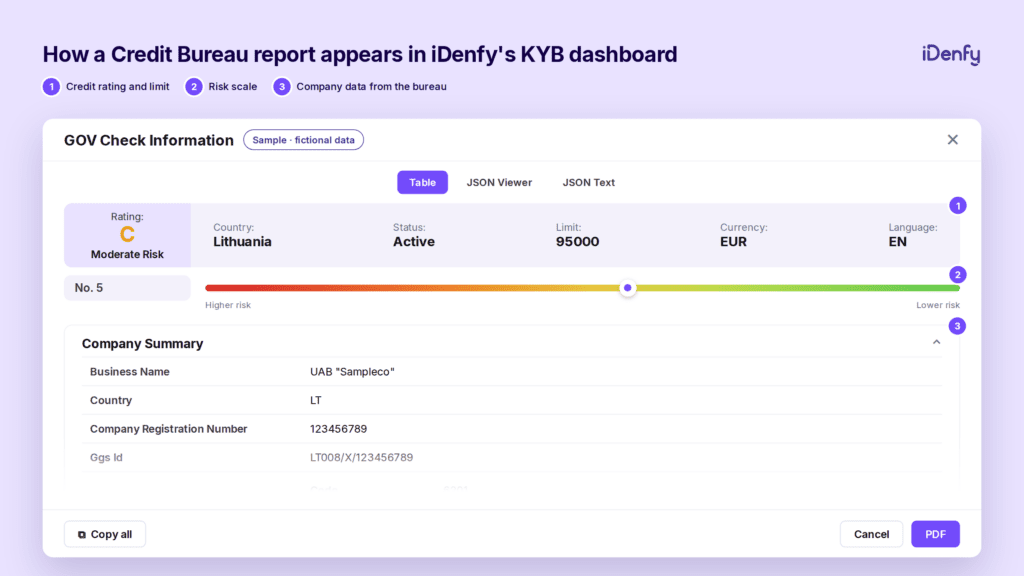
-> Some KYB software solutions provide full credit or government registry reports, as well as a lite version for a more concise background check on a company.
Each report has a different level of detail. The information available in a standard government registry report depends on the country and where the business is legally registered.
What type of report you need depends on your internal risk appetite, whether standard records are enough, or extra details like financial history and other risk signals are needed for your KYB onboarding.
iDenfy’s KYB report order statistics: 1,600+ reports across 55+ countries used (percentages show each report’s share of that country’s total orders)
| Country | Most ordered report | 2nd most ordered report | Market type |
|---|---|---|---|
| United Kingdom | Companies House report 70% | Credit Bureau lite report | Registry-led |
| United States | Gov Registers report 42% | Credit Bureau report (full) | Registry + full credit |
| Netherlands | Gov Registers report 52% | Credit Bureau lite report | Registry-led |
| France | Credit Bureau lite report 86% | Gov Registers lite report | Credit-led |
The biggest benefit here is that you can have a single document for review with custom details gathered from multiple sources, including various registries (especially useful for large, global enterprises that operate in different markets).
Why Automated Registry Checks Win Against Manual KYB Verification
🟣 Using an automated KYB service helps:
- Collect data from multiple corporate registries and review the findings, especially mismatched and linked red flags, in one place instead of manually searching separate sources.
- Reduce repetitive work, helping analysts make more evidence-based, faster KYB approvals, minimizing the need to go through endless emails, and improving the end-user experience, which is not so perfect if it takes weeks or even months to confirm and onboard another entity.
🟣 iDenfy’s Know Your Business solution can:
-> Store reports and source KYC and AML records on the same KYB dashboard for you
-> Use AI company data cross-matching and compare what the applicant entered against registry data and flag mismatches automatically
-> Provide you with important details like risk scores and timestamps alongside each case
-> Allow you to add internal notes from different compliance officers, making it easier to document each KYB application and go back to a case any time
-> Keep a fully compliant audit trail with the ability to access any company registry using the same platform, not lengthy, individual lookups or gated portal checks
Sounds like a good deal? Because it is. iDenfy automates access to 180+ company registries across 120+ countries. Book a free KYB dashboard tour right now, or get started right away.


 Download PDF