If your business serves the Czech market and carries out Know Your Customer (KYC) checks, you have the option of offering a Czech Bank iD to verify your customers. It lets eligible customers confirm their identity through their existing bank login credentials, without having to photograph and upload a physical ID document.
The biggest perk of the Czech Bank iD onboarding is that it’s more straightforward for someone who already uses their bank identity to access other online services. All they need to do is sign in through their bank, approve sharing their identity information, and return to your platform to continue signing up.
Before adding it to your onboarding process, though, you’ll need to understand which customers can use it and whether the available identity data meets your requirements. You’ll also need an alternative for customers who can’t use this method.
This guide explains how Czech Bank iD onboarding works and how it can fit alongside your platform’s standard document-based KYC flow.
What Is Czech Bank iD?
Czech Bank iD is a digital identity verification service that lets eligible users in the Czech Republic confirm their identity and access e-government and private-sector services using their existing banking credentials. It’s a form of non-document verification, meaning users don’t need to upload an identity document to confirm who they are.
Launched in 2021, it quickly became a popular way for people to verify their identity online. In July 2026, Bank iD reported that 5.3 million people used Bank iD in the Czech Republic, representing 80% of the working-age population.
Automate your KYC process
iDenfy verifies customers from 200+ countries in seconds. AI-powered, compliant, and trusted by 1,000+ companies.
Explore KYC SolutionWhy Offer Czech Bank iD During Customer Onboarding?
As the adoption figures show, Bank iD is already well established in the Czech market. Adding it to your KYC workflow can offer three practical benefits:
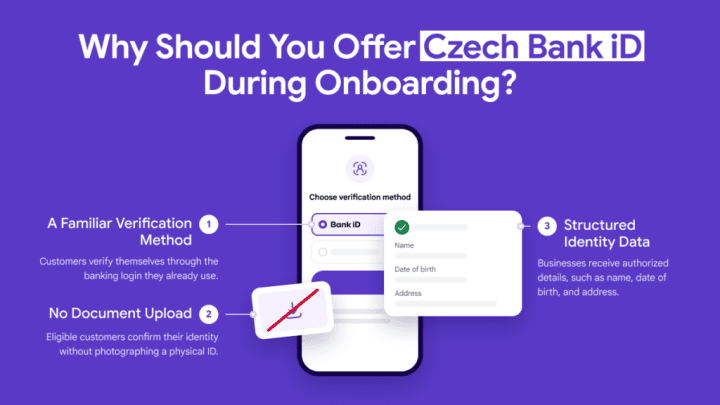
Give Customers a Familiar Verification Method
Bank iD redirects eligible customers to their bank’s authentication environment, where they sign in using existing credentials and authorize the transfer of identity data. This builds on an authentication flow they may already recognize from banking, government portals, and other digital services.
Remove the Document-Upload Step
Customers using this verification path don’t need to photograph a passport or ID card. This removes the document-capture issues that can interrupt onboarding, such as poor lighting, blurry images, or not having a physical ID nearby.
“Common challenges with Czech ID verification include users photographing a document displayed on another screen and submitting images with blurred or unreadable text. Even when the document is valid and the facial match is successful, verification can fail because required details, such as the residential address, cannot be reliably extracted.
Bank iD removes the need to photograph a physical document, helping reduce unnecessary rejections and making onboarding faster and smoother.” – Ugnė Morkūnaitė, Head of Verification Department
Receive Structured Identity Data
Your business receives selected identity details from the bank as structured fields, rather than extracting them from a document image. Those details can help populate customer records that can be passed into downstream KYC checks.
Related: Bank Account Verification [Guide]
What Information Can Businesses Receive?
Bank iD can return several categories of identity data as shown in the table below.
| Data category | Examples |
|---|---|
| Personal details | Given name, family name, date of birth, nationality, gender, birth number, place of birth |
| Contact details | Phone number, email |
| Address details | Address lines, city, postal code, country |
| Document details | Document type, number, issue and expiration dates, issuing country and authority |
| Bank details | Payment accounts (IBAN) |
| Other information | PEP/adult/limited legal capacity flags |
Note: Availability of data varies by bank.
The data you receive ultimately depends on what your business requests and what the customer’s bank holds and can provide. Besides, customers must approve the data transfer. If they decline to share information marked as required, they won’t be able to complete verification through that Bank iD flow.
Can Czech Bank iD Support KYC and AML Requirements?
Yes. Czech Bank iD can support the customer identification stage of your KYC and Anti-Money Laundering (AML) process. The Czech Financial Analytical Office (FAÚ) confirms that bank-issued electronic identity can be used to identify customers under the Czech AML Act.
However, that’s not to say that Bank iD covers all your AML obligations. Your business still needs to carry out customer due diligence (CDD) based on its activities and the customer’s risk profile. This can include:
- Understanding the purpose of the relationship
- Checking sanctions, politically exposed person (PEP) status, and adverse media for relevant risk information
- Reviewing activity throughout the relationship
In practice, Bank iD helps establish who the customer is, while your wider compliance process assesses the risks of doing business with them. For example, iDenfy’s AML Screening & Ongoing Monitoring Software can complement Czech Bank iD verification by screening customers against sanctions lists, PEP records, and adverse media, then monitoring for new matches after onboarding.
How to Add Czech Bank iD to Your KYC Onboarding Process
So, how do you bring Czech Bank iD into your onboarding flow? Let’s break it down.
1. Identify Eligible Customers and Use Cases
First, zero in on the customers you want to serve. They’ll need an eligible bank identity from a participating bank; operating in the Czech market doesn’t mean every applicant can use this method.
Some foreign residents may also qualify if they hold a Czech-issued identity document, such as a permanent residence permit, temporary protection visa, or temporary residence permit. However, their bank must support Bank iD verification using that document type.

Next, define the use case. Are you identifying a new customer, authenticating an existing one, or verifying someone acting for a business? Each requires a different decision about what happens after authentication. Verifying a company representative, for instance, doesn’t by itself establish the company’s ownership structure or that person’s authority to act.
2. Define Your Identity Data Requirements
Before configuring the integration, define how returned identity attributes will map to your customer records. Your system should link each verification result to the correct application and store the relevant information in the corresponding fields.
Just as important is defining the scope of your request, i.e., which identity details you need Bank iD to return. Bank iD recommends making scopes mandatory only when your application genuinely needs them. If a customer refuses to share required information, they can’t complete authentication.
If you need additional information, such as evidence of the customer’s source of funds (SoF), you’ll need to collect it separately and carry out the relevant checks.
3. Choose Your Integration Approach
You basically have two options: connect directly to Bank iD or use an identity verification provider that supports further KYC checks. What you decide comes down to how much of the integrations and wider document verification workflow your team wants to manage.
A direct connection involves:
- Registering in the developer portal and creating an application
- Configuring requested scopes, redirect URLs, and OIDC settings
- Obtaining credentials and testing in the sandbox
- Completing the organization registration and contracting process before configuring production
Alternatively, you can use a third-party solution such as iDenfy that lets you combine Czech Bank iD with document-based verification in one onboarding flow. The main advantage is flexibility: with iDenfy’s eID verification solution, you can use Czech Bank iD as a standalone identity verification method or combine it with document-based KYC workflows. In a combined flow, you can route eligible customers to Bank iD when document capture is unavailable, or image quality is poor, helping them continue onboarding.
Related: How to Implement a KYC API [3 Steps to Get Started]
4. Plan Verification Paths and Alternatives
You should also think through verification paths and alternatives if a customer can’t complete one verification method for some reason.
Plan a clear next step for situations like these:
- They can’t use Bank iD. Offer another way to verify their identity, such as your document verification process.
- They can’t submit a usable ID photo. Say a customer chooses document verification but can’t capture a clear image. With iDenfy, you can configure your onboarding flow to route eligible customers to Czech Bank iD instead, giving them another way to complete verification.
Whichever direction you use, your KYC workflow should define when applicants can switch methods, based on their eligibility and why the first attempt couldn’t be completed.
5. Connect Verification to Your Wider KYC Process
Once identity verification succeeds, map the result to the corresponding customer application and trigger the downstream checks defined in your KYC policy.
Say you want your workflow to initiate AML screening or collect information about intended account use. You should configure those steps within the onboarding flow and define how their results affect the approval decision.
Make sure you also have a human reviewer available for cases involving unresolved data mismatches, potential screening matches, or other risk signals that need further investigation.
Throughout the process, maintain an audit trail linking the verification result, screening outcomes, reviewer actions, and final decision.
6. Test the Onboarding Journey
The last step is to test your onboarding flow from start to finish, including what happens when something goes wrong. Check how it handles missing data, declined consent, failed authentication, and session timeouts, and confirm that each outcome triggers the correct next step.
When testing your flow, do so on both desktop and mobile, making sure customers receive clear instructions when they need to retry or switch verification methods.
After launch, monitor completion rates, retries, drop-off, and manual review volumes to spot friction and refine your routing rules. iDenfy team proactively reviews every partner’s identity verification flow, evaluates areas to lower friction, and introduces actionable items to improve your flows.
Offer Czech Bank iD Verification Through iDenfy
Czech Bank iD onboarding gives eligible customers a familiar way to verify themselves without photographing an ID document. It can sit alongside other verification methods within your wider KYC process.
With iDenfy, you can offer Czech Bank iD as a non-document verification option and configure it alongside your document-based flow through one dashboard. This gives your business flexibility to support local bank credentials while keeping another route available for customers who need it.
iDenfy offers document verification covering 16,000+ ID document types from 200+ countries and territories, with 24/7 human review available for cases needing further assessment.
Talk to our team about combining Czech Bank iD with the verification methods and additional checks your onboarding process needs.