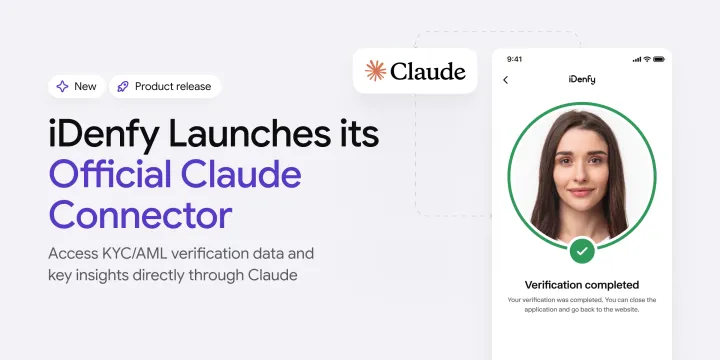
iDenfy has officially launched its Claude connector for KYC/KYB and AML compliance, allowing you to connect your iDenfy account to Claude through the Model Context Protocol (MCP).
Instead of working around the dashboard and looking for different metrics, you can access iDenfy’s statistics directly on Claude using natural language and questions, prompting the AI assistant to check verification statuses, review AML statistics, inspect webhook deliveries, and manage selected KYB custom rules.
In brief:
- iDenfy’s Claude Connector makes routine KYC/KYB and AML checks more convenient.
- Rather than switching between dashboard pages to find individual metrics, you can use it to request the wanted information in a single conversation.
- iDenfy’s assistant can also explain available settings and the available options, helping users understand configuration options before making changes.
Examples include the ability to filter results by country, compare certain statistics against last month, compile a custom table, or look into denied reasons to reduce drop-offs, among others. Read more to find out.
How Does the iDenfy Connector Work?
The iDenfy connector links Claude to your iDenfy dashboard account. It works both in Claude and in Claude Code. In general, connectors link Claude to various tools using MCP.
-> Keep in mind that the Claude connector can do whatever you can do yourself using your iDenfy account. That’s because it works through your manager account, and iDenfy checks your permissions on every request.
-> Please note that unlike the documentation MCP server, which only searches iDenfy’s documentation, this Claude account MCP server connects to your dashboard and accesses the data you authorize.
Automate your identity verification
See how iDenfy helps 1,000+ companies verify customers in seconds with AI-powered KYC.
Explore iDenfyHow to Get Started With iDenfy’s Claude Connector
To connect iDenfy to Claude, you need to:
- Add the connector. In Claude, go to Customize -> Connectors -> Add custom connector. Search for iDenfy as the name and https://mcp.idenfy.com/mcp as the server URL. Then, select Use your own OAuth client, enter the client ID from our setup guide, leave the client secret blank, and save.
- Authorize access. Sign in using your iDenfy account dashboard credentials. You can then review the available permissions and choose which areas Claude can access (view or edit).
- Ask questions. Start using the MCP and ask about iDenfy and your verification data directly via Claude. Depending on your account and the permissions, the system will provide you with supported metrics.
Before connecting, make sure both your manager and company accounts are active. Your manager account must be linked to a single company, as accounts with access to multiple companies aren’t supported. Your company needs to also have a payment method on file.
-> If you use single sign-on (SSO), contact our Tech Support to enable AI assistant connections for your account.
What Kind of Information Can I Get From iDenfy’s Claude Connector?
The connector works as an AI assistant and gives your business control over which data areas it can view or edit. That means it’s beneficial in various ways.
| Data area | What Claude can tell you | Try asking | Useful for |
|---|---|---|---|
| Verification settings | Every KYC, KYB and AML setting on your account, with its meaning, type and allowed values. With Edit access, Claude can change one setting at a time. Changes apply to live verifications. | “List all our AML settings and explain what each one does.” “Which KYC settings control how strict document checks are, and what values are allowed?” | Audit preparation, onboarding new team members, and reviewing current values before a risk policy change |
| Webhooks | The endpoints your account sends events to, plus recent deliveries with their status and your server’s response. Webhook payloads are never read. | “Which webhook deliveries failed this week, and what did our server return?” “Which endpoints are we sending events to right now?” | Finding out why a verification result was missed and checking endpoints after a release |
| Finances and units | Your balance, funds and unit limits, plus remaining units per service and their expiry date. | “How many verification units do we have left for each service, and when do they expire?” | Planning top-ups before units run out and giving finance quick answers without dashboard access |
For example, you can also easily review:
Identity Verification Statistics
- All of the data linked to KYC verification and the sessions that were approved/denied over your preferred time frame
- All of the details linked to a single ID verification based on its scan reference (for example, including AML findings if AML screening was applied)
- Other KYC details that you can filter out using custom requests, such as by country or document type
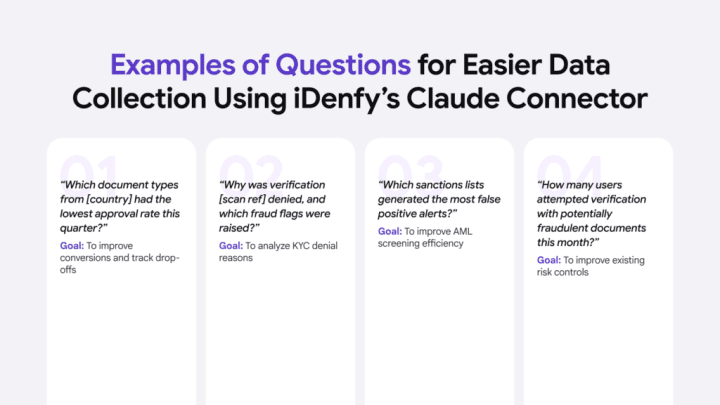
Try asking this question and get the needed information via Claude:
“What share of passport verifications were approved last month, compared with ID cards?”
Or:
“Check verification [scan reference]. What happened, and did the AML check raise any flags?”
AML Screening Results
- The AML alert rate and how many screenings generated AML hits
- The screening volume and how many AML checks were run by the system, for example, in the last month
- Ongoing monitoring statistics and how many new alerts were generated using ongoing monitoring during a certain period
- If there are any AML alerts that are still open and need manual review
To get your hands on this sort of information, you can ask:
“How did our AML alert volume change month over month?”
Or:
“What percentage of screenings generated an alert?”
Related: False Positives in AML Screening [Free Report Included]
Know Your Business (KYB) Verification Insights
- How many companies were approved or denied (including pending) during their KYB onboarding over a selected period of time
- The full list and linked statistics to the companies your company has verified
- Your custom rules and KYB workflows that you built with your configured client questionnaires
To see more detailed KYB insights, try asking:
“How many companies did we approve, deny and leave pending in October?”
You can also ask it to list existing rules and review configured KYB flows and questionnaires. For example:
“Can you draft an automation rule for [your condition] so I can review it before assigning it”
This is possible with Edit access, which enables you to use iDenfy’s AI assistant and create your KYB automation rules directly on Claude instead of the dashboard, in case you prefer this approach.
Is My Customer Data Secure When Using Claude?
Yes. iDenfy’s connector is private by design. It does not expose users’ personal identity verification data.
It works like this:
- Every KYC-related answer is built from a fixed list of non-personal fields, so names, document numbers and photos of your end users can’t be returned to Claude.
- AML-related answers are built around the statuses and the types of flags found, never the matched full names.
In other words, Claude can access only the supported fields within the data areas that you, as the user, authorize and give permission to access. You can review connected assistants and your access rights on iDenfy’s dashboard and then disconnect an assistant whenever you feel like it.
Every connected assistant appears under Settings -> Personal details -> Connected apps, with the access it holds. The connection also ends on its own after 7 days without use for security reasons.
| Tool | Access needed | What it does |
|---|---|---|
| get_finances | Finances · View | Returns your balance, expiry date and the unit allowance per service |
| list_webhooks | Webhooks · View | Lists the endpoints your account sends events to |
| list_webhook_deliveries | Webhooks · View | Lists recent deliveries, newest first, with the response from each receiving server |
| get_settings | Settings · View | Returns every configured KYC, KYB and AML setting |
| describe_settings | Settings · View | Returns the name, meaning, type and allowed values of each setting |
| update_setting | Settings · Edit | Changes one setting |
| get_kyc_statistics | Identity verification · View | Returns the approved share of KYC verifications over a period |
| get_kyc_verification | Identity verification · View | Returns one verification, looked up by scan reference |
| get_aml_check_statistics | AML · View | Returns how many AML screenings ran over a period, and how many raised a flag |
| get_aml_monitoring_statistics | AML · View | Returns how ongoing AML monitoring went over a period |
| get_kyb_statistics | KYB · View | Returns approved, denied and pending companies over a period |
| list_kyb_companies | KYB · View | Lists the companies your account verified |
| list_kyb_flows | KYB · View | Lists your configured KYB flows |
| list_kyb_automation_rules | KYB · View | Lists your configured automation rules |
| list_kyb_questionnaires | KYB · View | Lists the questionnaires shown to companies being verified |
| create_kyb_automation_rule | KYB · Edit | Creates one automation rule, unassigned |
When you connect, iDenfy shows a consent screen listing each data area, with separate View and Edit options (View never grants Edit)
It can’t retrieve document numbers, document photos, or users’ full names. Webhook payloads (automatic notifications sent between systems) are also excluded, and sensitive areas such as API keys, team member details, and other company info can’t be accessed.
The Biggest Benefits of iDenfy’s MCP Integration With Claude
The main idea around an MCP like iDenfy’s is that you can save a lot of time and get the information you need instantly instead of going around the dashboard and then making a separate report. For example, you can export a CSV, filter it by country, build a table, then compare it with last month’s export instantly. This helps analysts reduce their standard routine work and focus on flagged cases that require closer attention.
iDenfy’s MCP-compatible Claude connector works as a daily assistant in other roles, which can be beneficial for operational or technical tasks across different teams.
For example, it can be a good tool to:
- Get a better understanding of a potential new market launch (and track ID verification results in that particular country/jurisdiction to see if there aren’t any performance issues)
- Optimize user experience and conversion (to identify document types, for example, passports, that have a lower KYC approval rate)
- Monitor and assess the workload (and summarize KYC/AML activity faster by looking up metrics, such as screening volumes and flagged cases, to understand how much activity might require analysts’ attention)
- Manage accounts without complex adjustments or coding (to check verification statistics and remaining service units through natural-language prompts)
- Review webhook delivery statuses and response codes (for example, if your CRM didn’t receive an identity verification update, Claude can help you check whether the notification was delivered or returned an error)
iDenfy is one of the few RegTech service providers in the market right now that offers an official Claude connector, and that is for a reason:
“We want our customers to access the right data more freely on their own, and at the same time, continue to lean on our dedicated account managers and support teams at any time.”
Domantas Ciulde, the CEO of iDenfy
Sounds like a good deal, but you’d like to learn more about iDenfy’s KYC/KYB and AML stack first? Book a demo or start your free trial right away.